
Julien Carmagnac
julca
About Me
EXPERTISE
Generalist
Connect
LOCATION
WEBSITE
Houdini Skills
Availability
Not Specified
Recent Forum Posts
Render Flipbook : Change jpg quality Oct. 25, 2026, 5:34 a.m.
Hello,
When saving jpg from viewport while using render flipbook, jpg are heavy (maximum quality).
But I didn't find any parameter to tweak that.
How to change jpg quality ?
When rendering hundred and hundred of screen previews, size matter.

Thank you.
When saving jpg from viewport while using render flipbook, jpg are heavy (maximum quality).
But I didn't find any parameter to tweak that.
How to change jpg quality ?
When rendering hundred and hundred of screen previews, size matter.
Thank you.
Animate Motion Path in Solaris ? Aug. 20, 2026, 6:09 p.m.
Thank you @cwhite for your explanations.
Ok, not an easy road in my case for now but I'll try to do my best with APEX.
Ok, not an easy road in my case for now but I'll try to do my best with APEX.
H22 can't set preset "Permanent Default" Aug. 15, 2026, 5:43 a.m.
Hello,
Since H22 the way to set tool parameters as "Permanent Default" change... and just don't work.
Example to customize the polyextrude sop node :
Now we first need to create a node preset (named here for the example : "myPreset"), then set this preset as default.


First problem :
Then when call from radial menu, the permanent default preset as just ignored (it use the factory one).
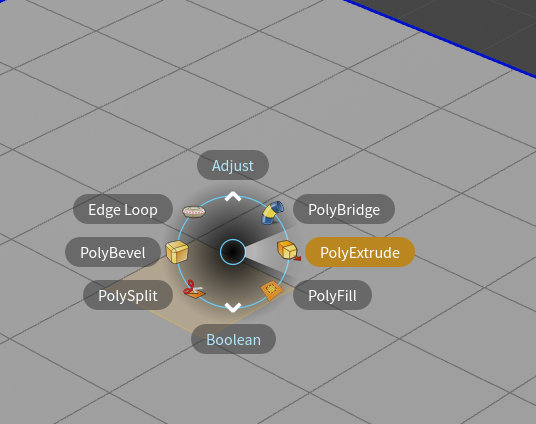
Others problems :
Now when call from tab menu you can notice that both operators entry are here instead just the permanent one :

Note to dev : Please think as user that tape first letter and hit entry key as quick as possible. Now that's means extra step to select the right version of operator.
And when called the "PolyExtrude (myPreset)" from selection, it don't link the node and also ignore primitive selection.

Did I miss something ?
Since H22 the way to set tool parameters as "Permanent Default" change... and just don't work.
Example to customize the polyextrude sop node :
Now we first need to create a node preset (named here for the example : "myPreset"), then set this preset as default.
First problem :
Then when call from radial menu, the permanent default preset as just ignored (it use the factory one).
Others problems :
Now when call from tab menu you can notice that both operators entry are here instead just the permanent one :
Note to dev : Please think as user that tape first letter and hit entry key as quick as possible. Now that's means extra step to select the right version of operator.
And when called the "PolyExtrude (myPreset)" from selection, it don't link the node and also ignore primitive selection.
Did I miss something ?