
Greg Hughes
litote
About Me
Connect
LOCATION
WEBSITE
Houdini Skills
Availability
Not Specified
Recent Forum Posts
Creating fire on fast objects? Sept. 7, 2026, 4:43 a.m.
Does anyone have experience with creating fire on fast moving objects?
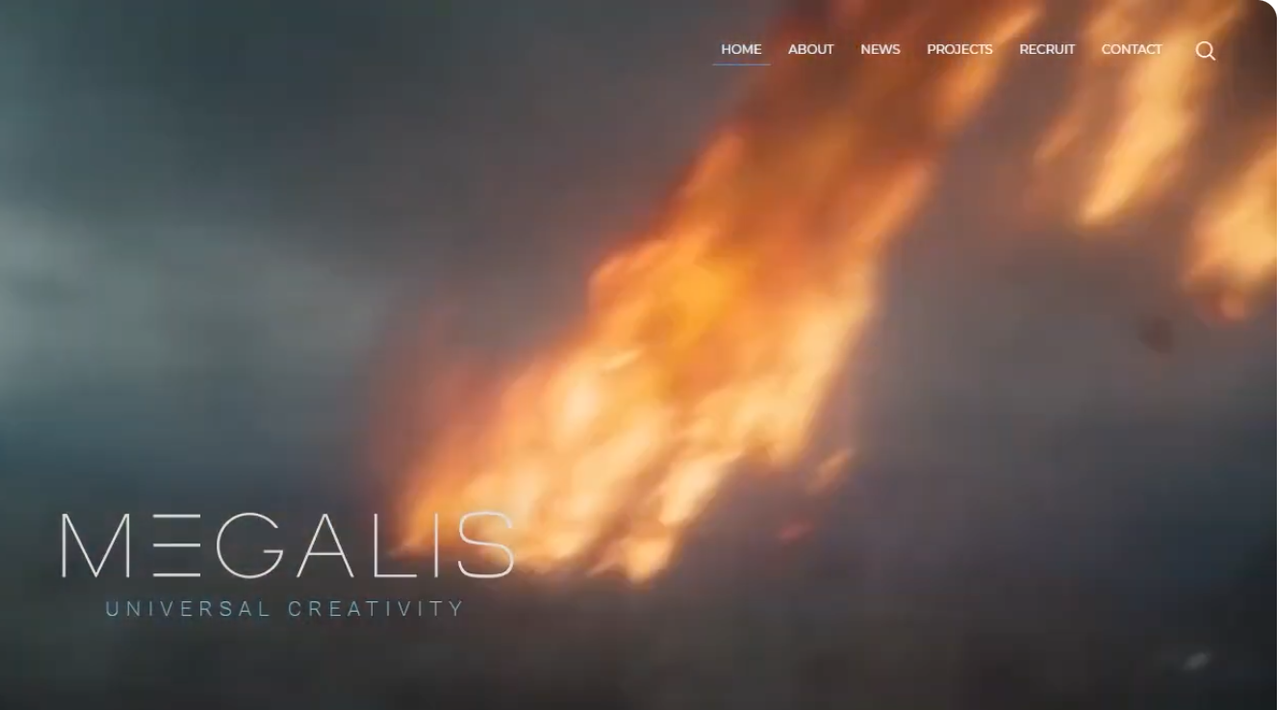
I am trying to emulate an ILM shot like the one in the image:

My approach has been to break up the burn attribute shae that creates the flame with an Attribute Noise node using Alligator type noise to get islands of flame rather than strings. I give the noise subtle animation.
I activate Velocity Blur in the Volume rasterise Attributes node to blur the islands together more.
I use a small value for Flame Lifespan in the Pyro Solver to keep the trails short.
Any tips would be welcome.
My result is blobbier than the ILM shot (similar to what I have seen in other shots) and I am wondering if they have their own custom tools, like noise, to achieve their more realistic look?
I would like to get a better noise effect which isn’t so blobby and does not create trails, but still creates detail in the flame.
I am trying to emulate an ILM shot like the one in the image:
My approach has been to break up the burn attribute shae that creates the flame with an Attribute Noise node using Alligator type noise to get islands of flame rather than strings. I give the noise subtle animation.
I activate Velocity Blur in the Volume rasterise Attributes node to blur the islands together more.
I use a small value for Flame Lifespan in the Pyro Solver to keep the trails short.
Any tips would be welcome.
My result is blobbier than the ILM shot (similar to what I have seen in other shots) and I am wondering if they have their own custom tools, like noise, to achieve their more realistic look?
I would like to get a better noise effect which isn’t so blobby and does not create trails, but still creates detail in the flame.
Creat variation in fire shapeon moving object? Aug. 31, 2026, 10:29 p.m.
Thanks Italimpex Productions!
I appreciate how much of your time you put in to producing such a comprehensive post. There are some clever techniques I wasn't aware of.
P.S.
On further experimentation, I found one way to get more variation in the fire like in the image is to adjust keyframes in the Pyro Bake Volume shader's Fire Intensity Ramp, particularly making the brightest parts more intense by increasing their Value above the default 1 (click on knot to set). This provides much more contrast of brightness.
I appreciate how much of your time you put in to producing such a comprehensive post. There are some clever techniques I wasn't aware of.
P.S.
On further experimentation, I found one way to get more variation in the fire like in the image is to adjust keyframes in the Pyro Bake Volume shader's Fire Intensity Ramp, particularly making the brightest parts more intense by increasing their Value above the default 1 (click on knot to set). This provides much more contrast of brightness.
Creat variation in fire shapeon moving object? Aug. 30, 2026, 11 p.m.
I am creating a fiery moving object (plane wing on fire) and am trying to create the effect as seen in the image link of a fiery object falling through the sky. In this image the fire is broken up, rather than being uniform. Would this be achieved by adding noise to the burn attribute to create islands of bright intensity? Or is there another method to create the variation?
Some methods create islands of points to source the fire, although I find this creates fire trails that tend to merge together in to a solid flame and you lose the broken up effect.
On another topic, some techniques use a particle simulation to create the source for the burn/flame, while others just use particles that are scattered on the surface of the geo. I am not sure what the benefits are for using a particle simulation, but I do notice that it can cause dots of fire where the particles separate from the particle stream, which looks unrealistic, and there seems to be no fix for this, is that correct? Any advice on why to use particle sims would be welcome. The main benefit I know of is that it can remove fire stepping problems for fast moving objects.
Some methods create islands of points to source the fire, although I find this creates fire trails that tend to merge together in to a solid flame and you lose the broken up effect.
On another topic, some techniques use a particle simulation to create the source for the burn/flame, while others just use particles that are scattered on the surface of the geo. I am not sure what the benefits are for using a particle simulation, but I do notice that it can cause dots of fire where the particles separate from the particle stream, which looks unrealistic, and there seems to be no fix for this, is that correct? Any advice on why to use particle sims would be welcome. The main benefit I know of is that it can remove fire stepping problems for fast moving objects.