-
How do I setup API Key Licensing?
-
API key licensing gives you the freedom of Login-Based Licensing without the need to manually login through hkey.
Login based licensing allows you to access your Houdini license directly from our SideFX license server, without needing to install your Houdini licenses directly on your machine. However login based licensing required you to stay online in order to access your Houdini licenses. API Key Licensing allows you to distribute the keys to users so they don't have to worry about logging in to use the SideFX license server. You may also distribute the keys to render nodes.
Generate the API Keys
-
Log into your SideFX portal using your license login.
-
Select Services and navigate to Manage applications authentication under the Developers API section.
-
Select Register a new application. Enter a Name for your application like "My API Keys" or something to your liking.
-
You will then see automatically generated, your client ID and secret keys.
-
Ensure then the following are set:
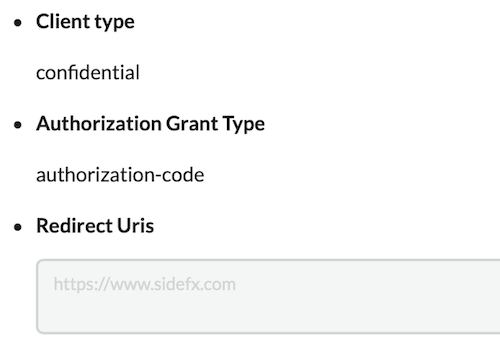
Configure the License Administrator to use API Keys
Launch the License Administrator and select File>Login and then press the. Use API Keys button.
Copy and paste the clientID/secret API keys.Configure hserver to use API Keys
If you don't want to copy and paste the API keys in the License Administrator's File>Login >Use API Keys button option, you can add the keys to the hserver.ini file.
The location of the hserver.ini file will depend on if you're running hserver as a service or non-service.
Please refer to the documentation for the location of the hserver.ini file.Windows
This example is for hserver running as a system service (default).
Put the hserver.ini options file in %SystemDrive%\ProgramData\SideFX.
For example: C:\ProgramData\SideFX
APIKey=clientID clientSecret
Restart the HoudiniServer service in services.msc.
If hserver is not run as a service put the hserver.ini file in %USERPROFILE%\AppData\Roaming\SideFX.
Linux
If you are running hserver as a systemd service, the hserver.ini file will need to be moved to /usr/lib/sesi/hserver. If the hserver directory does not exist, you will need to create it either as the root user or with sudo.
If you are not running hserver as a service and on-demand:
Create the hserver.ini file in $HOME/.local/share/sidefx/.
APIKey=clientID clientSecret
OSX
Put the hserver.ini options file in /Library/Preferences/sesi/hserver/.
If hserver is not run as a service put the hserver.ini file in $HOME/Library/Application Support/sidefx/.
APIKey=clientID clientSecret
-