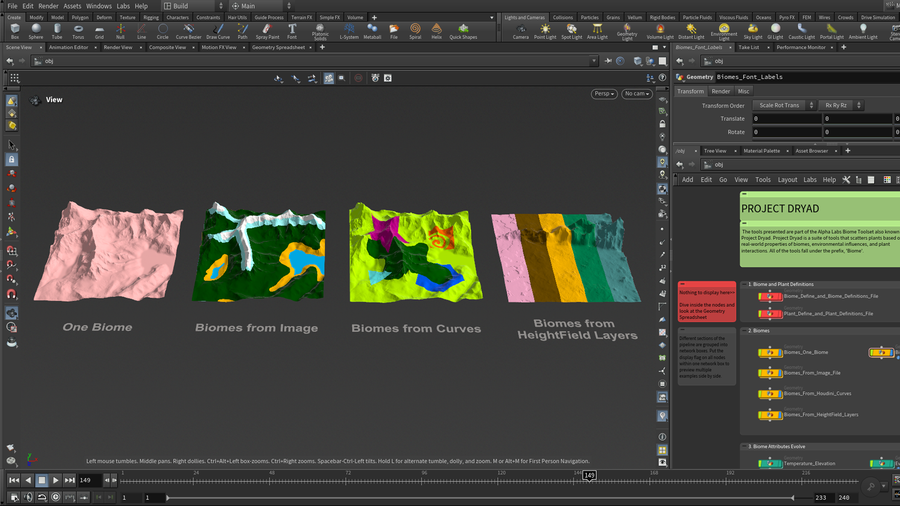
Biome Region Assign - Biome regions can be defined from an image, from curves, or from HeightField Layers.
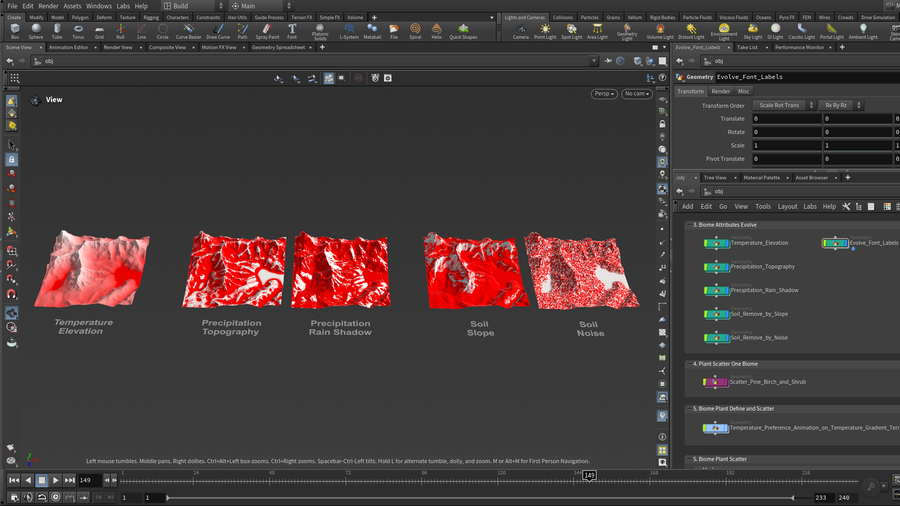
Biome Attributes Evolve - Terrain attributes (temperature, precipitation, and soil) are influenced by the terrain shape.
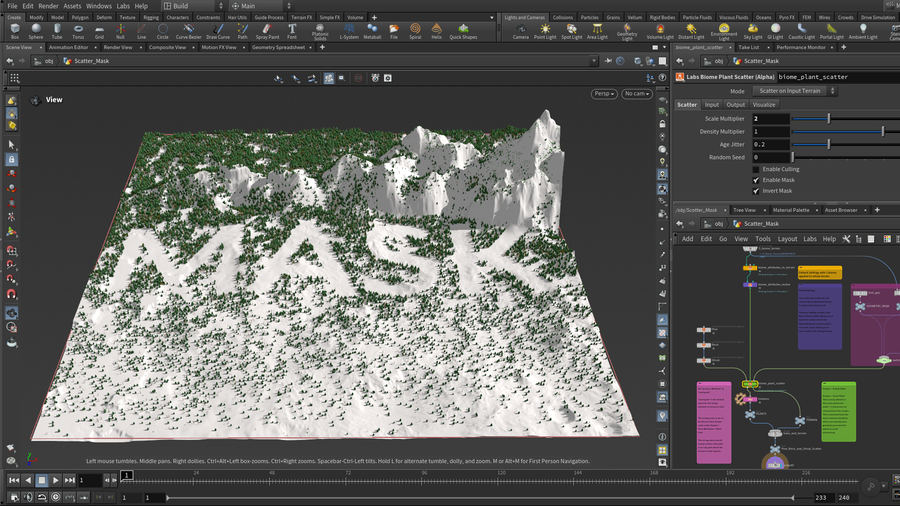
Biome Plant Scatter has a 3rd input option for geometry and/or a HeightField mask to exclude or limit plant growth in certain areas.
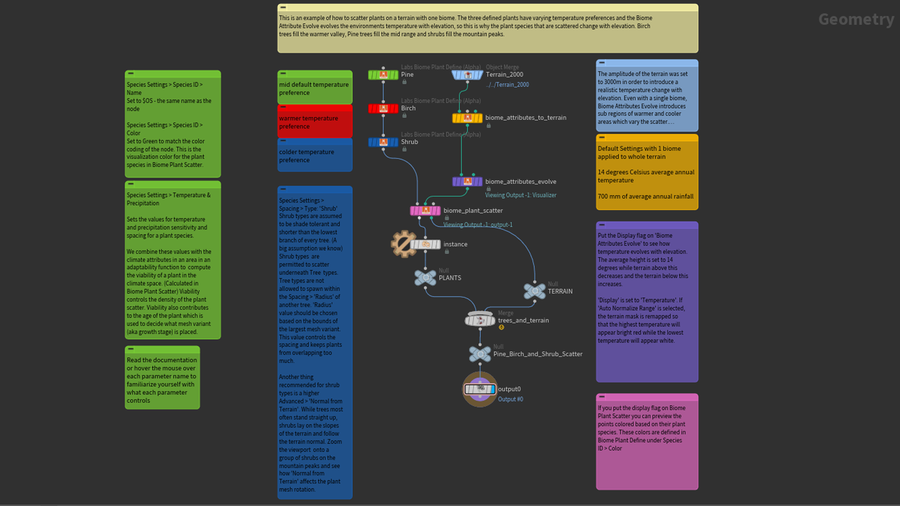
Biome tools network
バイオームデモ (Biome Demo)
日本語字幕をオンにしてビデオをご覧ください。
現実世界のバイオームの特性、環境からの影響、植物同士の関係に基づき、植物を配置する方法を見ていきます。この解説付プロジェクトでは、SideFX Labs からリリースされたアルファバイオームツールセットの各ツールを紹介しています。
この高度で科学に根差したシステムは、自然界の根幹をなす様々な営みを見本にしています。ユーザは、複数のバイオーム領域を生成し、それを使って最初の環境系アトリビュートを地形上に配置していきます。これらのアトリビュートは地形によって変化し、雨蔭や風への露出、土性、標高に伴う気温変化といった環境由来の様々な影響を再現します。その後、各々に適した気象条件や土壌を持つ領域に植物がマッチングされます。それらの領域では養分を巡り、周囲の植物との生存競争が繰り広げられています。
一部のバイオームツールには 20.5以降の Houdini が必要です。
CREATED BY

コメント
spiderbr 1年, 10ヶ月 前 |
Thanks very much for that!
IsStuff 1年, 10ヶ月 前 |
I gave the tools a good go a few months ago. one thing I did at the end that I wished I did sooner was test my plants in a grid with temperature rising in X and precipitation rising in Z. this simple grid with not too many plants scattered showed me why some plants were not covering areas I thought they should. I could see where there were places where no plant would grow and when I blurred values in temperature and precipitation, it made inhospitable areas. I ended up tweaking some generic shrubs to fill in areas like that. Perfect for debugging
TravisFX 1年, 5ヶ月 前 |
Hi Bailey, I'm going through the example scene and I'm having trouble getting the instanced plants into Solaris from the SOP level. I have a hunch it has something to do with the way the instance paths are assigned to the points, or @instancepath attrib. When using the Plant Definition node and sourcing from disk it generates a path to the asset on disk, VS sourcing from a merge node it generates an op:* path to the imported assets. When merging in the instances using the direct file path to the asset, soloraris returns an error, but using the define plants from merge it seems to work fine.
Example:
Source "From Directory" @instancepath
= F:/git/SideFx/SideFXLabsExamples/projects/dryad/alpha/biome_demo/assets/mesh/SM_Alpine_Forest_Shrub_Growth_1.fbx
Source "From Merge Path" *Done inside of a lops Create Sop Node with megascan assets*
= op:/obj/Scatter/lopnet1/sopcreate1/sopnet/create/Var11_LOD0
Do you think an update to the Biome toolkit Example scene can include a Solaris setup?
Thanks!
baileyh 1年, 5ヶ月 前 |
Hi Travis,
Good find. It seems the instanced assets in Solaris will only work with operator paths or usd files. I will fix the referenced geometry and add a Solaris setup to the updated file. Thanks for bringing it to my attention.
Thanks,
Bailey
Aten 3ヶ月, 2週間 前 |
when I load either of those scenes I get a ton of warnings about 'Ignoring data for locked node:...' and no trees are visible. Also the HDA for plant definitions seems to have errors I am on latest labs and Houdini 21.0.631
cheers
baileyh 3ヶ月, 1週間 前 |
Hi Aten,
Weird. There is no locked node in the hip file. plant define, plant definitions file, and plant scatter have all upgraded to minor version 1.3. I've double checked the biome demo hip file and I see trees and no warnings on my machine but I'll have another developer double check on their machine. The tree assets are no longer embedded in the plant define hda so if you are opening an older hip file that uses opdef: references, you'll either need to downgrade plant_define to version 1.2 or preferably use version 1.3 and change the file path to point to assets in $SIDEFXLABS/geo.
If there are others seeing similar issues, please leave a comment.
-Bailey
baileyh 3ヶ月, 1週間 前 |
Another dev confirmed there were trees in the file. He did run into a segmentation fault and some UI warnings opening this 21.0.631 hip file in H22 but all was well after opening the file the second time.
tto-houdini 3ヶ月 前 |
Hey Bailey,
Thank you so much for the breakdown of these tools, I have been trying to figure out how to best use them! Is the practice file for Houdini 21.0.631? I am on 21.0.512, would there be any adaptability for that Houdini version? When I did open the file I got a bunch of errors and the tree references weren't working.
One major step I am held up on is the biome region assign, I can't see the guide geometry and it gets stuck on a cook. Would my HF be too dense? I tried the different versions of the tool but for every one of them it gets stalled out on the guide geometry cook.
Thank you for any help!
Charles
baileyh 3ヶ月 前 |
Hi Charles,
Do you have the latest Daily Build of the SideFX Labs package installed? (21.0.744 and up should work) I'm not noticing any problems when opening the file with an older Houdini version 21.0.462, so .512 should be fine.
For Biome Region Assign, try increasing the Grid Spacing if Division Mode is set to By Size, or decrease the Grid Samples if Division Mode is set to By Axis. The Biome Region Assign output can be much lower resolution than the terrain input into Biome Attributes to Terrain. If that doesn't help, you can submit a bug with an example hip file by emailing support: https://www.sidefx.com/support-programs/
-Bailey
tto-houdini 2ヶ月, 3週間 前 |
Hi Bailey!
I do believe I have the production build installed, would that one still work? I think I was working through some of the learning gaps I had for the functionality of this tool, it looks like I may have it setup correctly working now! I tried to do those adjustments using the Size and Axis division, but I am not seeing any changes in the results, but there might be something I am missing above those nodes too. I'm also kind of thrown off on what to do with the Subnet of all the asset variants. How would I link that to the biomes?
I used the Labs Tree Generator tool to make my trees, shrubs, palms, etc. then created a proxy and render version for all the different types, would the proxy be useful in this workflow or could I use the hipoly rendered version of my vegetation? When I am exporting the instanced plants from the OBJ network to Solaris could I use the proxy and render LODs too? Looking at the instancing result the proxies are very useful for seeing the layout and how vegetations are coming in, this is such a useful tool! Thanks again for all your help and creating a great tool!
Big Thanks!
Charles
baileyh 2ヶ月, 3週間 前 |
Hi Charles,
The latest Labs production build (21.0.729) is out of date and you'll need the latest daily build of Labs instead. You can install it from the launcher under Labs/Packages.
For Biome Region Assign, try dropping down the 'Labs Biome Configure Multibiomes' tool recipe to see how the biome pipeline is set up with a biome region assign node.
There is a subnetwork named 'Tree_Shrub_Assets' in the Scatter_Mountain_Lake_Terrain example. In that example you can look at the plant define nodes and see how those models are referenced under the Species Variants tab in the 'Mesh Variant' parameters.
You can use the Instancer in Solaris to instance plants. In the biome_demo_unreal example, https://www.sidefx.com/contentlibrary/biomes-in-unreal, take a look at the lopnet at obj/Five_Biome_Landscape_Unreal/Five_Biome_Landscape1/lopnet1 to see how I instance USD files with the Solaris Instancer. These usd assets have a proxy and render version as well. The important part is to set up the "Name" attribute on Biome Plant Define to be able to use the Solaris Instancer with Prototype Index set to Name Attribute.
Thanks for the kind words!
-Bailey
tto-houdini 2ヶ月, 3週間 前 |
Hi Bailey,
Thank you for the extra help and knowledge about the tool! I really appreciate your time and troubleshooting walkthroughs! If I was to update the Labs daily build tool would I need to update Houdini too? My current version of Houdini houses Arnold plug-ins and I would need to up-version that as well.
I created my trees using the Labs Tree Generator tutorial and was using those trees as my asset variants. For my textures that I applied I used a quickmaterial on my trunk, branches, and secondary branches, but I am using Cd for the leaves. I am kinda getting mixed up on how to bring in those materials for each layer or as a whole material that I build in the material library? The leaves are showing up in the render but the tree trunks/branches are not. Is there a way to bring in a quickmaterial or the materials in the labs tree gen tool? I feel like I am so close!lol
I noticed on the plant define under the species settings in the advanced subsection there is a material set path, is that where I would want to plug in the materials for the quickmaterial or the labs tree gen final leaf generator material? I am wondering how that would effect the color of the leaves in Solaris? I am also saving my assets as a bgeo.sc, should I make them .fbxs or .usds?
Materials are my Achilles heel! I am so sorry for so many questions!lol
Thank you,
Charles
baileyh 3ヶ月 前 |
Hi Charles,
Do you have the latest Daily Build of the SideFX Labs package installed? (21.0.744 and up should work) I'm not noticing any problems when opening the file with an older Houdini version 21.0.462, so .512 should be fine.
For Biome Region Assign, try increasing the Grid Spacing if Division Mode is set to By Size, or decrease the Grid Samples if Division Mode is set to By Axis. The Biome Region Assign output can be much lower resolution than the terrain input into Biome Attributes to Terrain. If that doesn't help, you can submit a bug with an example hip file by emailing support: https://www.sidefx.com/support-programs/
-Bailey
Please log in to leave a comment.