How to turn off 'Highlight Selection'?

   4226   5   0
User Avatar
Member
29 posts
Joined: 11月 2017
オフライン
Hey, a small question,
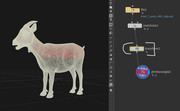
when selecting say the Transform node, it is highlighting the model in the viewport,
which sometimes can be too distracting.
Is there a way to not show this wireframe "on" thing?
thanks
Itai

[postimg.cc]
Edited by itai - 2021年7月29日 08:45:41
User Avatar
Member
114 posts
Joined: 7月 2019
オフライン
As minimum you can set display mode for Current model geometry to Wire Bounding Box.
Edited by FaitelTech - 2021年7月29日 09:03:03

Attachments:
display mode.png (1.6 MB)

User Avatar
Member
29 posts
Joined: 11月 2017
オフライン
Got it, thanks!
User Avatar
Member
803 posts
Joined: 2月 2017
オフライン
You could also switch to show display operator. You can also assign hotkeys for that.

Cheers
CYTE

Attachments:
Untitled-1.jpg (259.9 KB)

User Avatar
Member
29 posts
Joined: 11月 2017
オフライン
CYTE
displ
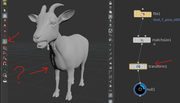
This is great, but it hides the Transform node's control too..
[postimg.cc]
Edited by itai - 2021年7月30日 03:40:07
User Avatar
Member
803 posts
Joined: 2月 2017
オフライン
Yes, I know. I have it assigned to a hotkey. That way you can first activate your transform tool, then set the option to show display operator. That way you keep the gizmo but lose the wireframe.

Cheers
CYTE
Edited by CYTE - 2021年7月30日 12:28:16
  • Quick Links