Enrique De la Garza - CG Supervisor Frame48
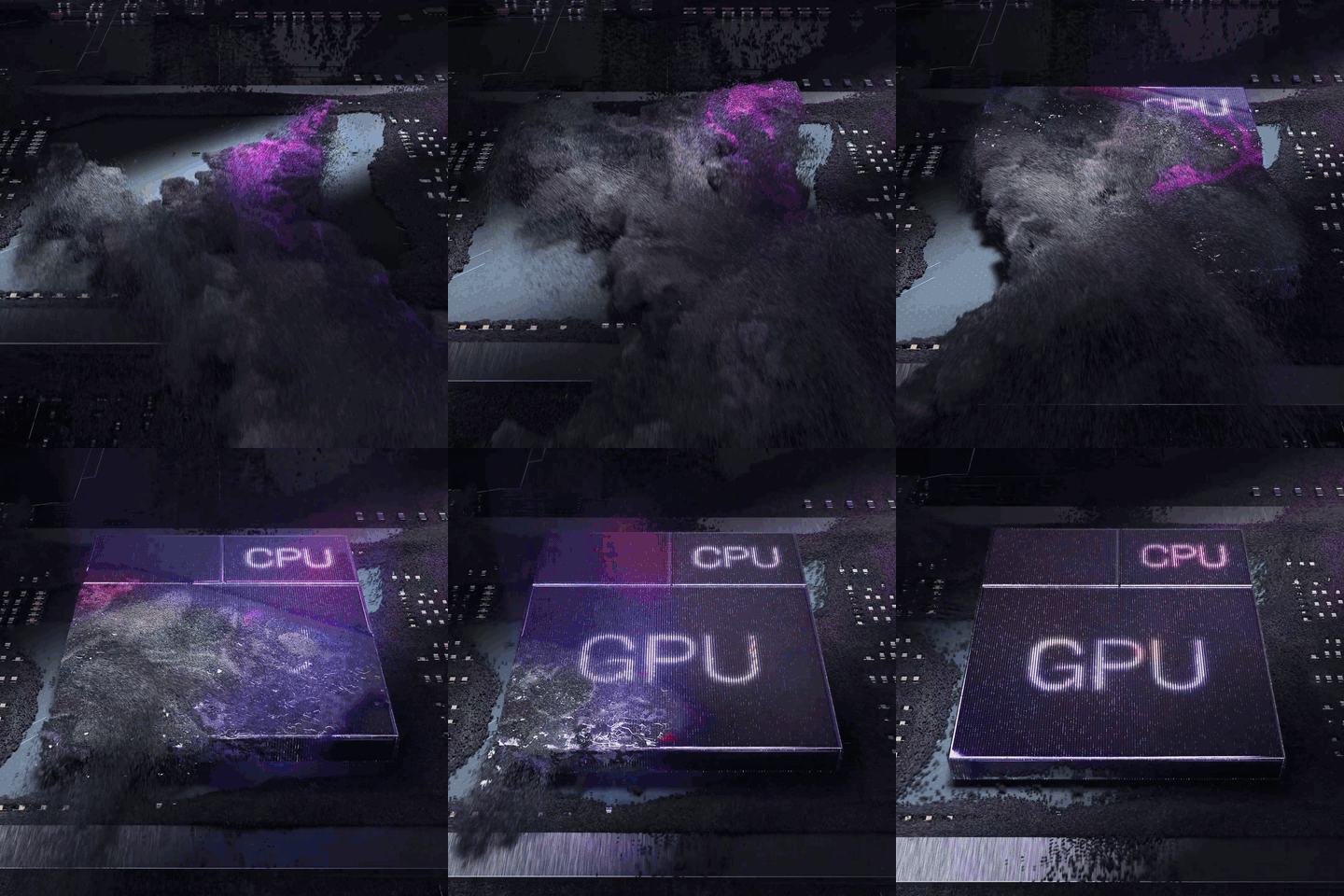
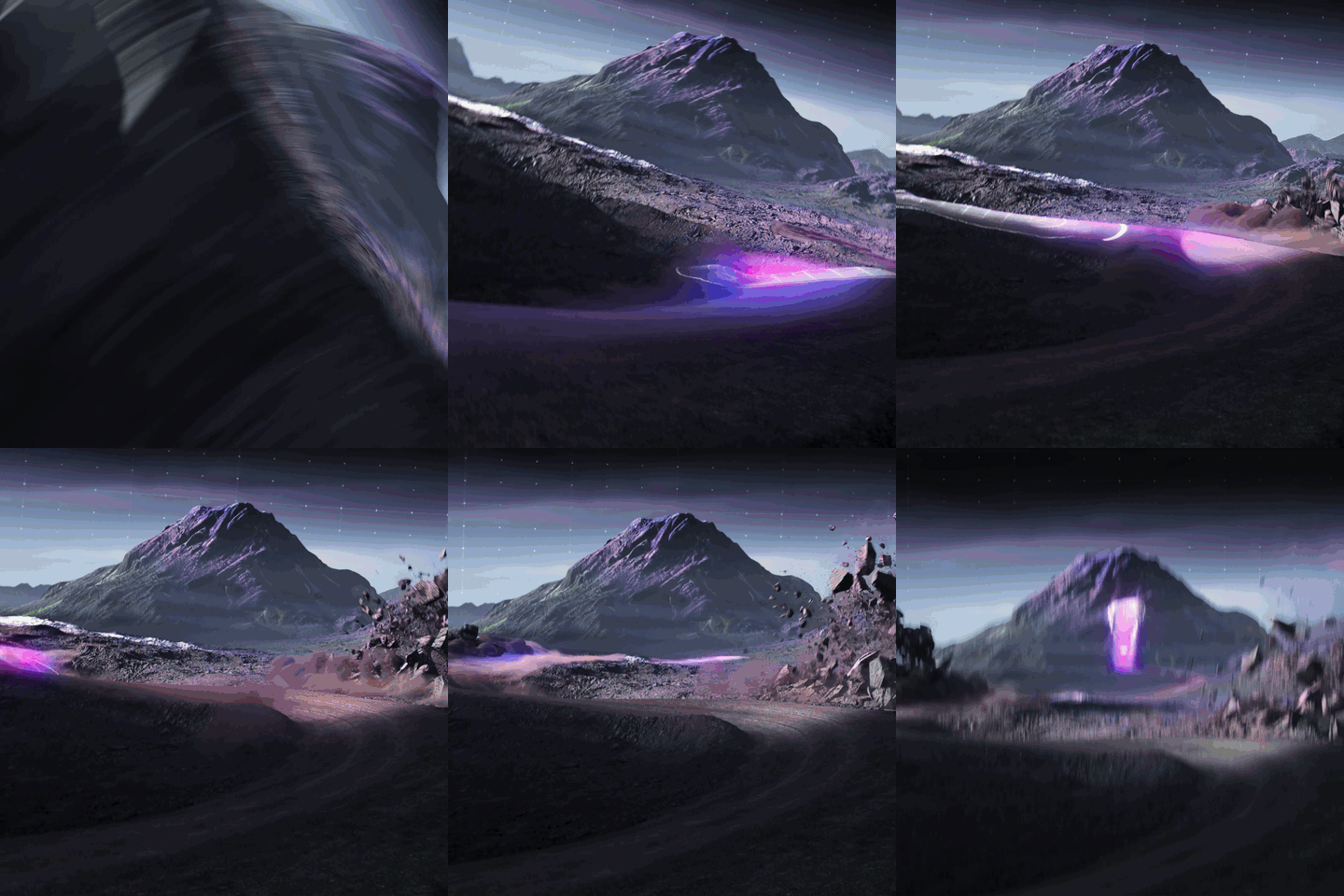
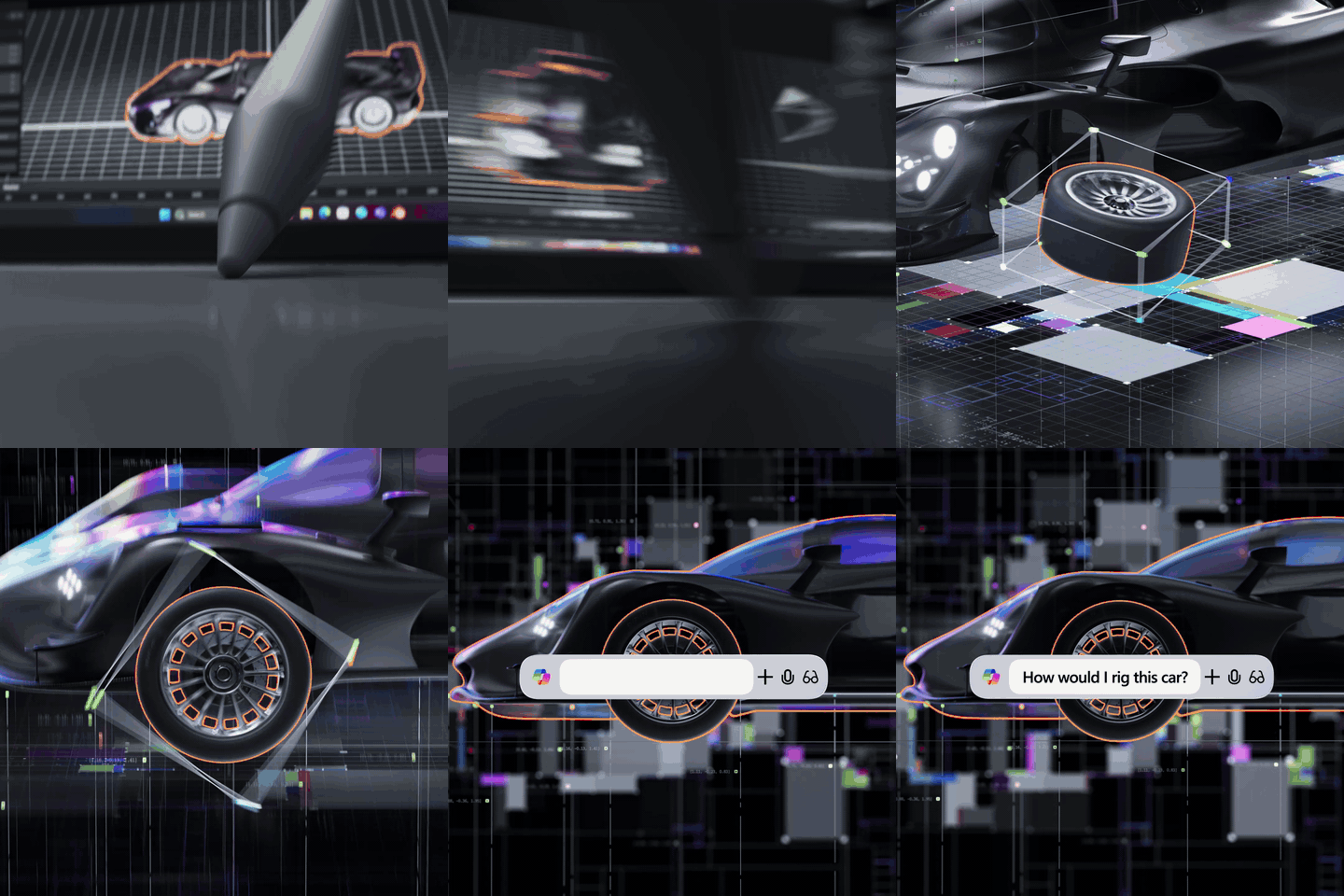
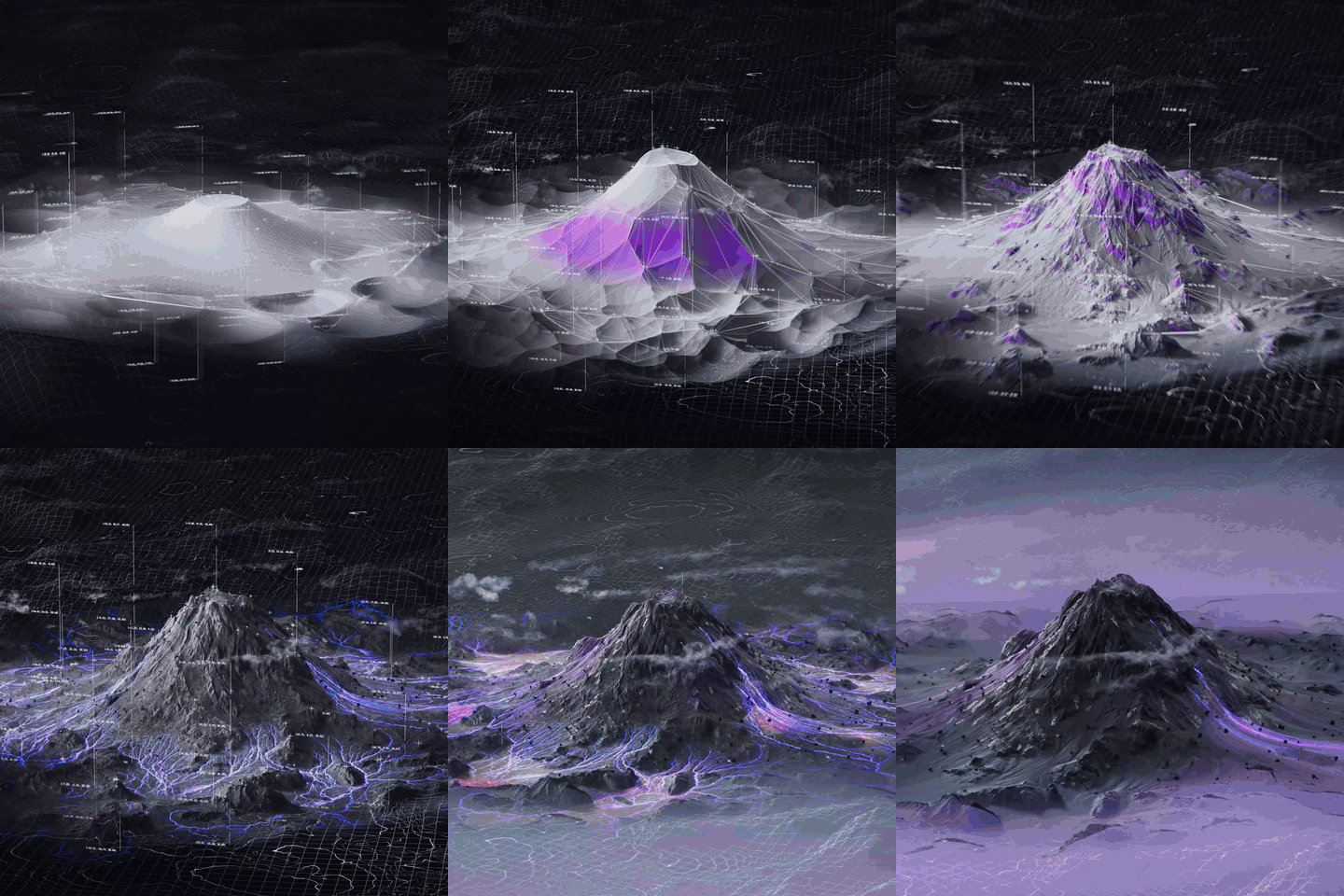
Frame48, the Los Angeles CG studio known for premium product work with brands like Sonos and Shimano, recently took on a story that was close to home for Lenovo. Their spot for the Yoga Pro 7a campaign is told from the point of view of a CG artist who is going through the process of sculpting a volcanic landscape, rigging a hyper sports car, and driving it through an explosion of light and color.
Delivered as a 60-second film with a set of cutdowns, the project ran for eight weeks with eight artists, alongside other jobs in production.
"This was a chance to push ourselves into more traditional FX work. Things like Pyro, FLIP, rigid bodies, stuff that one would immediately associate with Houdini, but the kind of work we don't usually get to do on a product ad," said Enrique de la Garza, CG Supervisor at Frame48, who architected the studio's transition to a USD-based pipeline. "Being able to spend a couple of weeks doing R&D to explore the various looks for the terrain, and different techniques for all the FX elements was really fun and rewarding on this one"
#bmgqUju.is-media-grid {
column-count: 1;
column-gap: 10px;
padding: 10px;
}
#bmgqUju .gallery-item {
position: relative;
break-inside: avoid;
border-radius: 0px;
margin-bottom: 10px;
line-height: 0; /* Eliminate extra space */
cursor: pointer;
overflow: hidden;
/* box-shadow: 5px 5px 0px #00000012;*/
}
#bmgqUju .gallery-item img {
width: 100%;
height: auto;
transition: .8s all;
margin: 0;
}
#bmgqUju .gallery-item .caption {
position: absolute;
bottom: 0;
left: 0;
width: 100%;
background-color: rgba(0, 0, 0, 0.4);
color: #fff;
padding: 12px 15px;
opacity: 0;
transition: all 0.8s ease;
overflow: hidden;
text-overflow: ellipsis;
box-sizing: border-box;
font-family: system-ui, -apple-system, BlinkMacSystemFont, 'Segoe UI', Roboto, Oxygen, Ubuntu, Cantarell, 'Open Sans', 'Helvetica Neue', sans-serif;
font-size: .9em;
font-weight: 200;
line-height: 1.2;
}
#bmgqUju .gallery-item .caption h4 {
font-weight: 300;
font-size: 1.1em;
margin: 0 0 0.1em;;
}
#bmgqUju .gallery-item:hover .caption {
opacity: 1;
}
#bmgqUju .gallery-item .caption {
transform: translateY(100%);
transition: transform 0.5s ease, opacity 0.5s ease;
}
#bmgqUju .gallery-item:hover .caption {
transform: translateY(0%);
opacity: 1;
}
#bmgqUju .gallery-item .caption {
background-color: #fff;
color: #000;
}
#bmgqUju .gallery-item .caption * {
color: #000;
}
@media (max-width: 800px) {
#bmgqUju.is-media-grid {column-count: 3;}
}
@media (max-width: 600px) {
#bmgqUju.is-media-grid {column-count: 2;}
}
@media (max-width: 400px) {
#bmgqUju.is-media-grid {column-count: 1;}
}
.gallery-item .gallery-video-overlay {
width: 100%;
height: 100%;
position: absolute;
top: 0; left: 0;
background: rgba(255,255,255,0.000001);
}
.gallery-item video {
height: auto;
width: 100%;
object-fit: cover;
}
A Pipeline Built for Handoff
Behind the work sat a bigger story than the spot itself. The Lenovo job was one of the first major productions to run end-to-end on a pipeline Frame48 had rebuilt from the ground up the previous
year.
#yZQAkeq.is-media-grid {
column-count: 2;
column-gap: 20px;
padding: 20px;
}
#yZQAkeq .gallery-item {
position: relative;
break-inside: avoid;
border-radius: 0px;
margin-bottom: 20px;
line-height: 0; /* Eliminate extra space */
cursor: pointer;
overflow: hidden;
/* box-shadow: 5px 5px 0px #00000012;*/
}
#yZQAkeq .gallery-item img {
width: 100%;
height: auto;
transition: .8s all;
margin: 0;
}
#yZQAkeq .gallery-item .caption {
position: absolute;
bottom: 0;
left: 0;
width: 100%;
background-color: rgba(0, 0, 0, 0.4);
color: #fff;
padding: 12px 15px;
opacity: 0;
transition: all 0.8s ease;
overflow: hidden;
text-overflow: ellipsis;
box-sizing: border-box;
font-family: system-ui, -apple-system, BlinkMacSystemFont, 'Segoe UI', Roboto, Oxygen, Ubuntu, Cantarell, 'Open Sans', 'Helvetica Neue', sans-serif;
font-size: .9em;
font-weight: 200;
line-height: 1.2;
}
#yZQAkeq .gallery-item .caption h4 {
font-weight: 300;
font-size: 1.1em;
margin: 0 0 0.1em;;
}
#yZQAkeq .gallery-item:hover .caption {
opacity: 1;
}
#yZQAkeq .gallery-item .caption {
transform: translateY(100%);
transition: transform 0.5s ease, opacity 0.5s ease;
}
#yZQAkeq .gallery-item:hover .caption {
transform: translateY(0%);
opacity: 1;
}
#yZQAkeq .gallery-item .caption {
background-color: #fff;
color: #000;
}
#yZQAkeq .gallery-item .caption * {
color: #000;
}
@media (max-width: 800px) {
#yZQAkeq.is-media-grid {column-count: 3;}
}
@media (max-width: 600px) {
#yZQAkeq.is-media-grid {column-count: 2;}
}
@media (max-width: 400px) {
#yZQAkeq.is-media-grid {column-count: 1;}
}
.gallery-item .gallery-video-overlay {
width: 100%;
height: 100%;
position: absolute;
top: 0; left: 0;
background: rgba(255,255,255,0.000001);
}
.gallery-item video {
height: auto;
width: 100%;
object-fit: cover;
}
The problems it was built to solve are the ones every small studio knows: scene handoff, dividing work across people, and tight deadlines. The studio's old approach leaned on HDAS to share assets between shots. "They get you close," de la Garza said, "but we'd end up with dozens of unlocked HDAS, and editing contents plus version control still meant manually pulling updates shot by shot."
Old workflow with HDAS in the /obj context
#VY3aP2M.is-media-grid {
column-count: 2;
column-gap: 20px;
padding: 20px;
}
#VY3aP2M .gallery-item {
position: relative;
break-inside: avoid;
border-radius: 0px;
margin-bottom: 20px;
line-height: 0; /* Eliminate extra space */
cursor: pointer;
overflow: hidden;
/* box-shadow: 5px 5px 0px #00000012;*/
}
#VY3aP2M .gallery-item img {
width: 100%;
height: auto;
transition: .8s all;
margin: 0;
}
#VY3aP2M .gallery-item .caption {
position: absolute;
bottom: 0;
left: 0;
width: 100%;
background-color: rgba(0, 0, 0, 0.4);
color: #fff;
padding: 12px 15px;
opacity: 0;
transition: all 0.8s ease;
overflow: hidden;
text-overflow: ellipsis;
box-sizing: border-box;
font-family: system-ui, -apple-system, BlinkMacSystemFont, 'Segoe UI', Roboto, Oxygen, Ubuntu, Cantarell, 'Open Sans', 'Helvetica Neue', sans-serif;
font-size: .9em;
font-weight: 200;
line-height: 1.2;
}
#VY3aP2M .gallery-item .caption h4 {
font-weight: 300;
font-size: 1.1em;
margin: 0 0 0.1em;;
}
#VY3aP2M .gallery-item:hover .caption {
opacity: 1;
}
#VY3aP2M .gallery-item .caption {
transform: translateY(100%);
transition: transform 0.5s ease, opacity 0.5s ease;
}
#VY3aP2M .gallery-item:hover .caption {
transform: translateY(0%);
opacity: 1;
}
#VY3aP2M .gallery-item .caption {
background-color: #fff;
color: #000;
}
#VY3aP2M .gallery-item .caption * {
color: #000;
}
@media (max-width: 800px) {
#VY3aP2M.is-media-grid {column-count: 3;}
}
@media (max-width: 600px) {
#VY3aP2M.is-media-grid {column-count: 2;}
}
@media (max-width: 400px) {
#VY3aP2M.is-media-grid {column-count: 1;}
}
.gallery-item .gallery-video-overlay {
width: 100%;
height: 100%;
position: absolute;
top: 0; left: 0;
background: rgba(255,255,255,0.000001);
}
.gallery-item video {
height: auto;
width: 100%;
object-fit: cover;
}
The decision to commit came at the end of 2024. "Tom and I were chatting after finishing a big round of challenging, time-consuming projects, looking at problem areas in our workflow and how to optimize the way we work as a team," de la Garza recalled. "I'd been following USD development for a couple of years but was always hesitant to implement it, since it would mean a complete overhaul of our systems. But the year's work was done, we had three or four slow weeks before the end of the year, and I decided to finally commit and embark on the journey of building a USD pipeline for the studio."
When Frame48 became a 100% Houdini studio, USD and Solaris became the backbone of the pipeline by design, integrated across every department. The first payoff was a feeling close to real-time collaboration. A client note landed on an asset, or an animation tweak went into a shot, and it propagated across the project with a single click, no more going shot by shot to pull new updates.
#ffCZfQ3.is-media-grid {
column-count: 1;
column-gap: 10px;
padding: 10px;
}
#ffCZfQ3 .gallery-item {
position: relative;
break-inside: avoid;
border-radius: 0px;
margin-bottom: 10px;
line-height: 0; /* Eliminate extra space */
cursor: pointer;
overflow: hidden;
/* box-shadow: 5px 5px 0px #00000012;*/
}
#ffCZfQ3 .gallery-item img {
width: 100%;
height: auto;
transition: .8s all;
margin: 0;
}
#ffCZfQ3 .gallery-item .caption {
position: absolute;
bottom: 0;
left: 0;
width: 100%;
background-color: rgba(0, 0, 0, 0.4);
color: #fff;
padding: 12px 15px;
opacity: 0;
transition: all 0.8s ease;
overflow: hidden;
text-overflow: ellipsis;
box-sizing: border-box;
font-family: system-ui, -apple-system, BlinkMacSystemFont, 'Segoe UI', Roboto, Oxygen, Ubuntu, Cantarell, 'Open Sans', 'Helvetica Neue', sans-serif;
font-size: .9em;
font-weight: 200;
line-height: 1.2;
}
#ffCZfQ3 .gallery-item .caption h4 {
font-weight: 300;
font-size: 1.1em;
margin: 0 0 0.1em;;
}
#ffCZfQ3 .gallery-item:hover .caption {
opacity: 1;
}
#ffCZfQ3 .gallery-item .caption {
transform: translateY(100%);
transition: transform 0.5s ease, opacity 0.5s ease;
}
#ffCZfQ3 .gallery-item:hover .caption {
transform: translateY(0%);
opacity: 1;
}
#ffCZfQ3 .gallery-item .caption {
background-color: #fff;
color: #000;
}
#ffCZfQ3 .gallery-item .caption * {
color: #000;
}
@media (max-width: 800px) {
#ffCZfQ3.is-media-grid {column-count: 3;}
}
@media (max-width: 600px) {
#ffCZfQ3.is-media-grid {column-count: 2;}
}
@media (max-width: 400px) {
#ffCZfQ3.is-media-grid {column-count: 1;}
}
.gallery-item .gallery-video-overlay {
width: 100%;
height: 100%;
position: absolute;
top: 0; left: 0;
background: rgba(255,255,255,0.000001);
}
.gallery-item video {
height: auto;
width: 100%;
object-fit: cover;
}
On the Lenovo job, that paid off repeatedly. "A big one was when we had to completely change the car model a couple of hours before end of day, with several shots queued to render over the weekend," de la Garza said. "Will, one of our artists, swapped the entire car for a completely different model, paying close attention to keeping a matching scene-graph structure and mesh names. Because the structure matched the old car and our rigging template uses identical control names, the moment those updates were published, every shot containing that asset just updated and preserved its animation. We queued everything we needed and went home on time."
That pattern became the daily rhythm of the job. The laptop and its accessories changed; the volcanic mountain asset kept evolving, accumulating more than 36 versions over the project. "That's the fun of USD," de la Garza said. "I drop a reference to the asset into my shot once, and never have to touch it again to get every update."
#hEjC4Op.is-media-grid {
column-count: 2;
column-gap: 20px;
padding: 20px;
}
#hEjC4Op .gallery-item {
position: relative;
break-inside: avoid;
border-radius: 0px;
margin-bottom: 20px;
line-height: 0; /* Eliminate extra space */
cursor: pointer;
overflow: hidden;
/* box-shadow: 5px 5px 0px #00000012;*/
}
#hEjC4Op .gallery-item img {
width: 100%;
height: auto;
transition: .8s all;
margin: 0;
}
#hEjC4Op .gallery-item .caption {
position: absolute;
bottom: 0;
left: 0;
width: 100%;
background-color: rgba(0, 0, 0, 0.4);
color: #fff;
padding: 12px 15px;
opacity: 0;
transition: all 0.8s ease;
overflow: hidden;
text-overflow: ellipsis;
box-sizing: border-box;
font-family: system-ui, -apple-system, BlinkMacSystemFont, 'Segoe UI', Roboto, Oxygen, Ubuntu, Cantarell, 'Open Sans', 'Helvetica Neue', sans-serif;
font-size: .9em;
font-weight: 200;
line-height: 1.2;
}
#hEjC4Op .gallery-item .caption h4 {
font-weight: 300;
font-size: 1.1em;
margin: 0 0 0.1em;;
}
#hEjC4Op .gallery-item:hover .caption {
opacity: 1;
}
#hEjC4Op .gallery-item .caption {
transform: translateY(100%);
transition: transform 0.5s ease, opacity 0.5s ease;
}
#hEjC4Op .gallery-item:hover .caption {
transform: translateY(0%);
opacity: 1;
}
#hEjC4Op .gallery-item .caption {
background-color: #fff;
color: #000;
}
#hEjC4Op .gallery-item .caption * {
color: #000;
}
@media (max-width: 800px) {
#hEjC4Op.is-media-grid {column-count: 3;}
}
@media (max-width: 600px) {
#hEjC4Op.is-media-grid {column-count: 2;}
}
@media (max-width: 400px) {
#hEjC4Op.is-media-grid {column-count: 1;}
}
.gallery-item .gallery-video-overlay {
width: 100%;
height: 100%;
position: absolute;
top: 0; left: 0;
background: rgba(255,255,255,0.000001);
}
.gallery-item video {
height: auto;
width: 100%;
object-fit: cover;
}
With rigging templates, even if the model changes animation is preserved with APEX
#MLdHDBA.is-media-grid {
column-count: 1;
column-gap: 10px;
padding: 10px;
}
#MLdHDBA .gallery-item {
position: relative;
break-inside: avoid;
border-radius: 0px;
margin-bottom: 10px;
line-height: 0; /* Eliminate extra space */
cursor: pointer;
overflow: hidden;
/* box-shadow: 5px 5px 0px #00000012;*/
}
#MLdHDBA .gallery-item img {
width: 100%;
height: auto;
transition: .8s all;
margin: 0;
}
#MLdHDBA .gallery-item .caption {
position: absolute;
bottom: 0;
left: 0;
width: 100%;
background-color: rgba(0, 0, 0, 0.4);
color: #fff;
padding: 12px 15px;
opacity: 0;
transition: all 0.8s ease;
overflow: hidden;
text-overflow: ellipsis;
box-sizing: border-box;
font-family: system-ui, -apple-system, BlinkMacSystemFont, 'Segoe UI', Roboto, Oxygen, Ubuntu, Cantarell, 'Open Sans', 'Helvetica Neue', sans-serif;
font-size: .9em;
font-weight: 200;
line-height: 1.2;
}
#MLdHDBA .gallery-item .caption h4 {
font-weight: 300;
font-size: 1.1em;
margin: 0 0 0.1em;;
}
#MLdHDBA .gallery-item:hover .caption {
opacity: 1;
}
#MLdHDBA .gallery-item .caption {
transform: translateY(100%);
transition: transform 0.5s ease, opacity 0.5s ease;
}
#MLdHDBA .gallery-item:hover .caption {
transform: translateY(0%);
opacity: 1;
}
#MLdHDBA .gallery-item .caption {
background-color: #fff;
color: #000;
}
#MLdHDBA .gallery-item .caption * {
color: #000;
}
@media (max-width: 800px) {
#MLdHDBA.is-media-grid {column-count: 3;}
}
@media (max-width: 600px) {
#MLdHDBA.is-media-grid {column-count: 2;}
}
@media (max-width: 400px) {
#MLdHDBA.is-media-grid {column-count: 1;}
}
.gallery-item .gallery-video-overlay {
width: 100%;
height: 100%;
position: absolute;
top: 0; left: 0;
background: rgba(255,255,255,0.000001);
}
.gallery-item video {
height: auto;
width: 100%;
object-fit: cover;
}
USD also let the team split a shot cleanly into departments - Layout, Animation, FX, and Lighting, each building non-destructively on the one before. Any number of artists could work on a single shot at once, each layered on top of the previous person's work without overwriting it.
For Tom Teller, Frame48's founder and executive creative director, the pipeline changed what the studio could take on.
"I trusted Enrique to architect our pipeline because he has a rare top-to-bottom view of production, from the artist's seat all the way up to the producer's," said Tom. "Every tool he's built and every decision he's made prioritizes what actually matters in production while protecting artist autonomy. Because of the systems he designed, we can now put multiple artists on a single shot at once, and push a change across dozens of shots without opening them one by one, something a studio our size simply couldn't do before."
"The most painful thing the USD pipeline solved for me was manually tracking and updating asset and shot versions," said Kyle Lin, CG Artist at Frame48. "Before the shift, you had to check for outdated assets and update them before you even started a shot - now I just load the shot and work, without worrying I've grabbed an old version. No more submissions to the farm with outdated assets!"
The pipeline starts with assets, and Frame48 built a template aimed at getting a 3D model animation-ready as fast as possible. An artist ingests a model, clicks a single button, and the template automatically produces a basic APEX-rigged USD asset, ready for animators to start blocking their shots. "Our current record from raw model to an animation-ready v001 is 26 seconds, I'll take on any challenger willing to beat this hahaha." Enrique said.
World Speed record geo -> usd -> apex ->usd
#uSzuQQI.is-media-grid {
column-count: 1;
column-gap: 10px;
padding: 10px;
}
#uSzuQQI .gallery-item {
position: relative;
break-inside: avoid;
border-radius: 0px;
margin-bottom: 10px;
line-height: 0; /* Eliminate extra space */
cursor: pointer;
overflow: hidden;
/* box-shadow: 5px 5px 0px #00000012;*/
}
#uSzuQQI .gallery-item img {
width: 100%;
height: auto;
transition: .8s all;
margin: 0;
}
#uSzuQQI .gallery-item .caption {
position: absolute;
bottom: 0;
left: 0;
width: 100%;
background-color: rgba(0, 0, 0, 0.4);
color: #fff;
padding: 12px 15px;
opacity: 0;
transition: all 0.8s ease;
overflow: hidden;
text-overflow: ellipsis;
box-sizing: border-box;
font-family: system-ui, -apple-system, BlinkMacSystemFont, 'Segoe UI', Roboto, Oxygen, Ubuntu, Cantarell, 'Open Sans', 'Helvetica Neue', sans-serif;
font-size: .9em;
font-weight: 200;
line-height: 1.2;
}
#uSzuQQI .gallery-item .caption h4 {
font-weight: 300;
font-size: 1.1em;
margin: 0 0 0.1em;;
}
#uSzuQQI .gallery-item:hover .caption {
opacity: 1;
}
#uSzuQQI .gallery-item .caption {
transform: translateY(100%);
transition: transform 0.5s ease, opacity 0.5s ease;
}
#uSzuQQI .gallery-item:hover .caption {
transform: translateY(0%);
opacity: 1;
}
#uSzuQQI .gallery-item .caption {
background-color: #fff;
color: #000;
}
#uSzuQQI .gallery-item .caption * {
color: #000;
}
@media (max-width: 800px) {
#uSzuQQI.is-media-grid {column-count: 3;}
}
@media (max-width: 600px) {
#uSzuQQI.is-media-grid {column-count: 2;}
}
@media (max-width: 400px) {
#uSzuQQI.is-media-grid {column-count: 1;}
}
.gallery-item .gallery-video-overlay {
width: 100%;
height: 100%;
position: absolute;
top: 0; left: 0;
background: rgba(255,255,255,0.000001);
}
.gallery-item video {
height: auto;
width: 100%;
object-fit: cover;
}
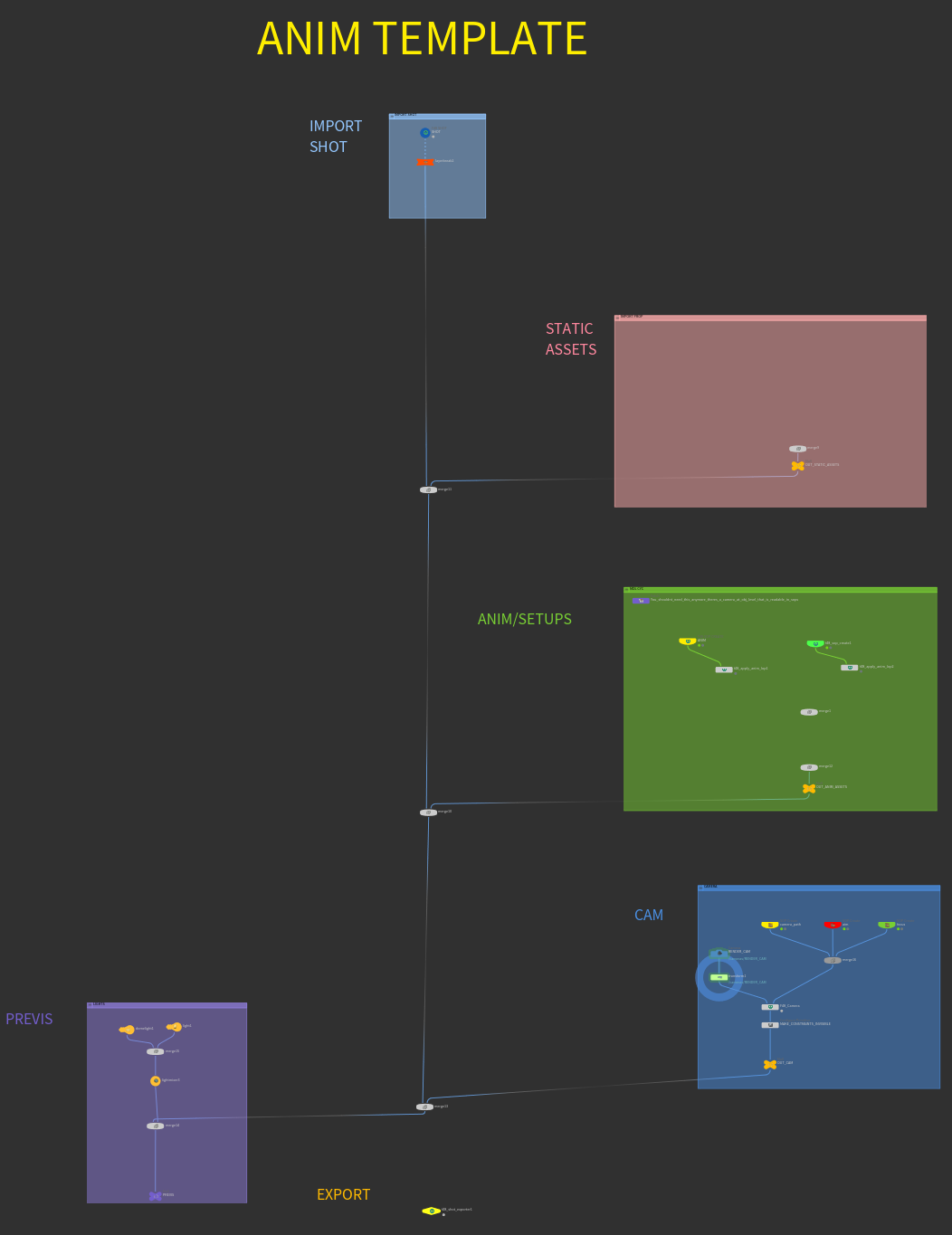
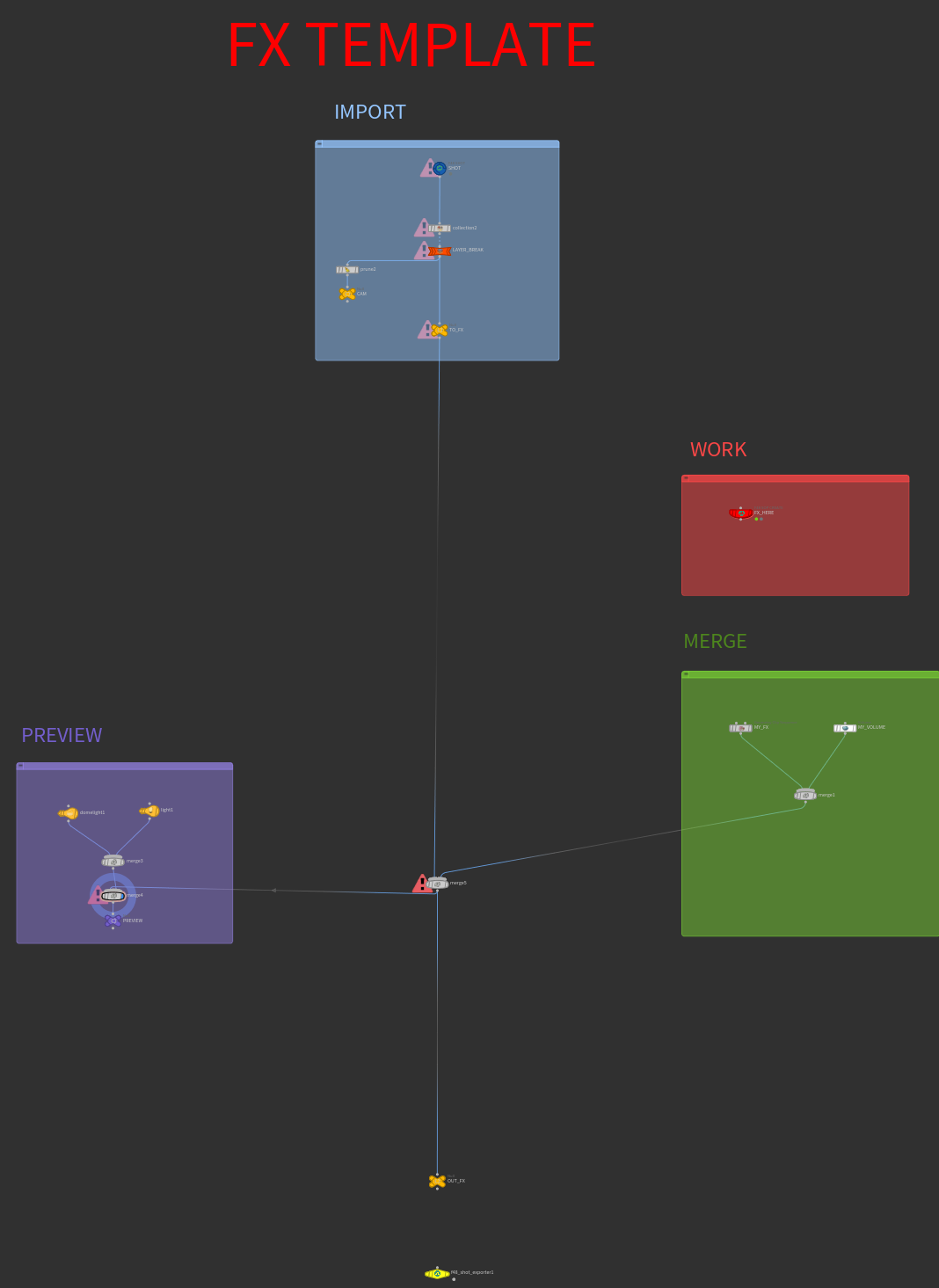
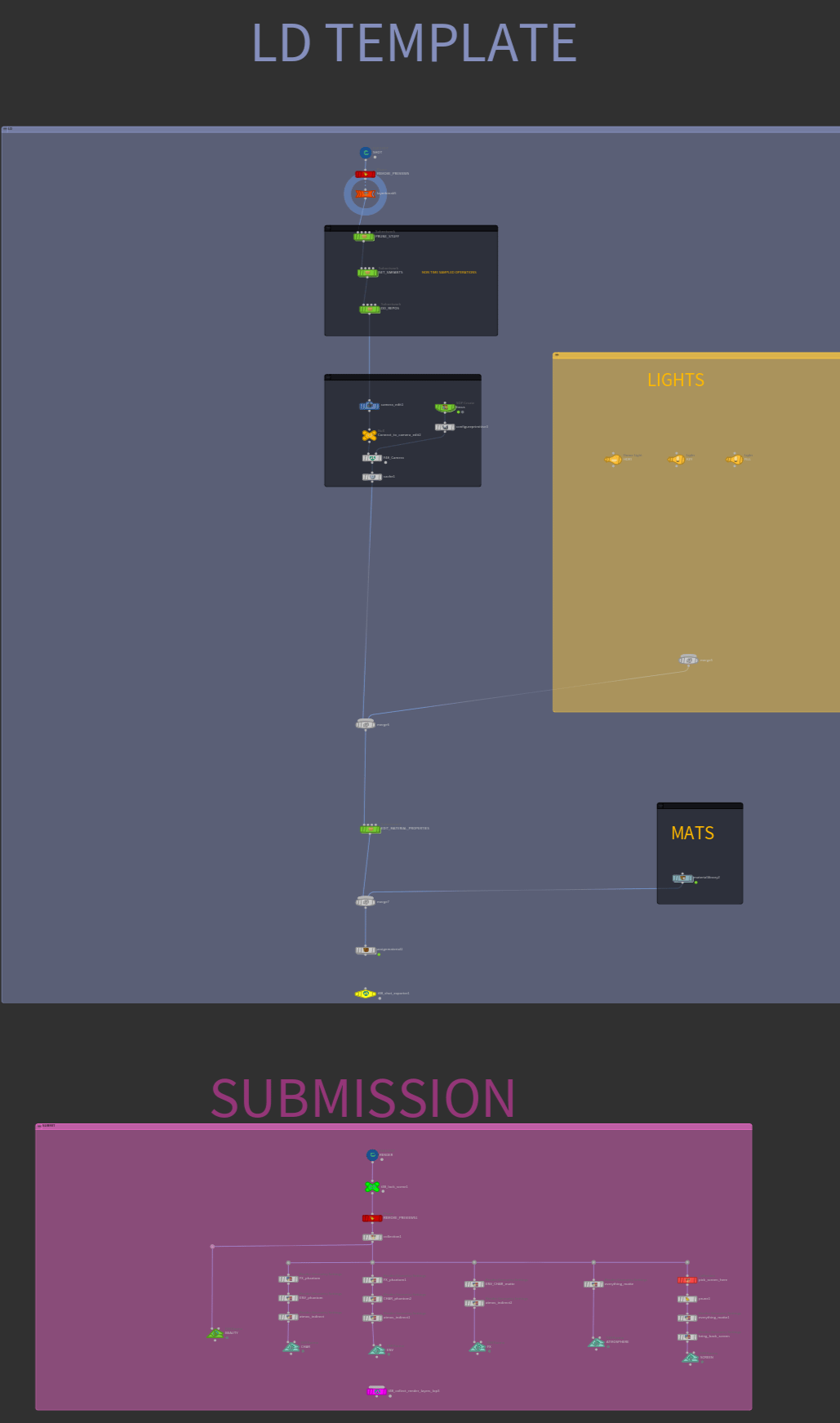
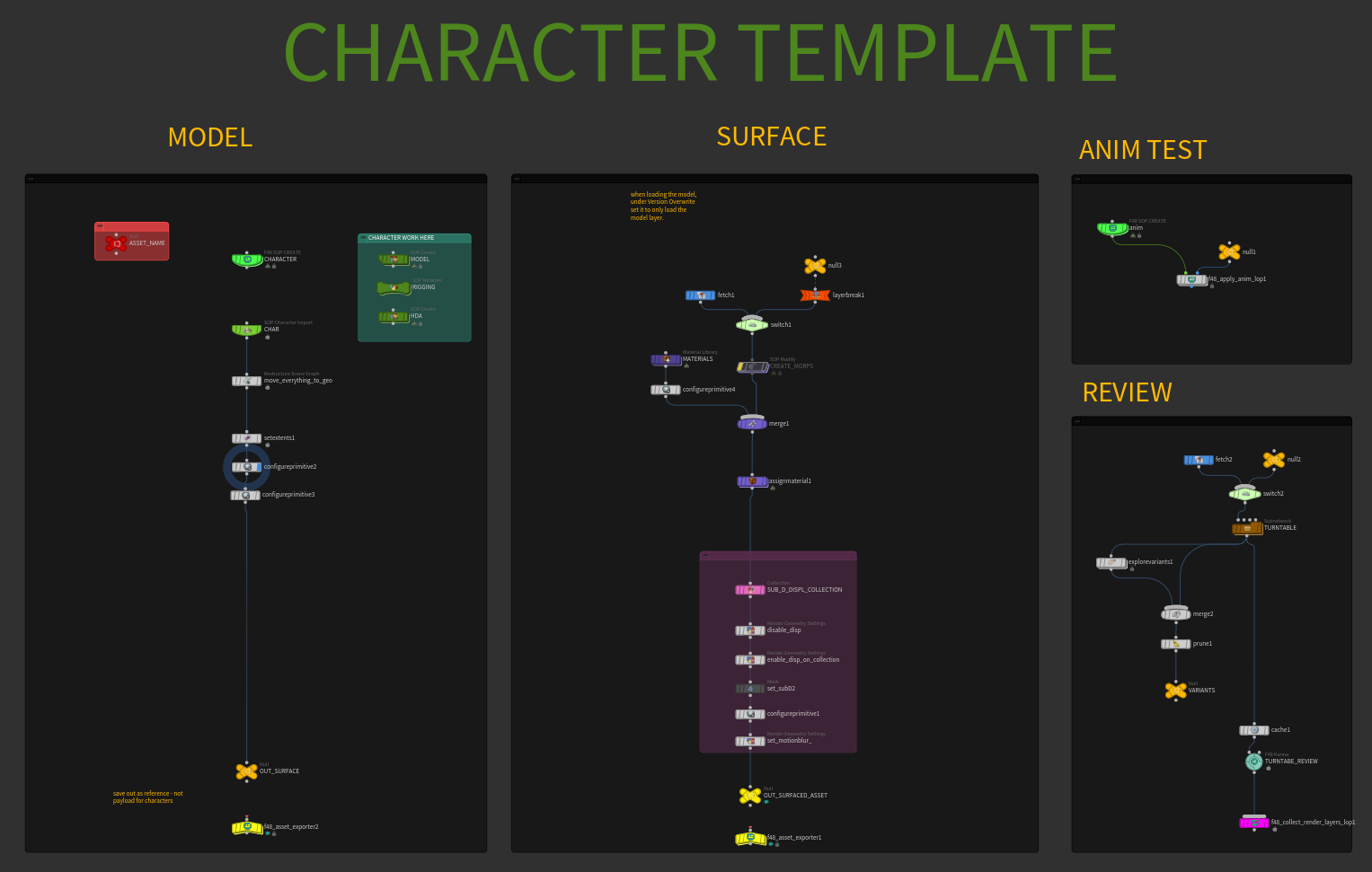
"I'm a big believer in templates and standardization. This is the main reason we've been able to keep up with the demands of producing high quality advertisements with a relatively small sized team. We have templates for everything, ranging from FX and ANIM setups to basic things like how department or asset hip files should be structured."
Some of the studio's HIP templates
#pNHR2OD.is-media-grid {
column-count: 4;
column-gap: 10px;
padding: 10px;
}
#pNHR2OD .gallery-item {
position: relative;
break-inside: avoid;
border-radius: 0px;
margin-bottom: 10px;
line-height: 0; /* Eliminate extra space */
cursor: pointer;
overflow: hidden;
/* box-shadow: 5px 5px 0px #00000012;*/
}
#pNHR2OD .gallery-item img {
width: 100%;
height: auto;
transition: .8s all;
margin: 0;
}
#pNHR2OD .gallery-item .caption {
position: absolute;
bottom: 0;
left: 0;
width: 100%;
background-color: rgba(0, 0, 0, 0.4);
color: #fff;
padding: 12px 15px;
opacity: 0;
transition: all 0.8s ease;
overflow: hidden;
text-overflow: ellipsis;
box-sizing: border-box;
font-family: system-ui, -apple-system, BlinkMacSystemFont, 'Segoe UI', Roboto, Oxygen, Ubuntu, Cantarell, 'Open Sans', 'Helvetica Neue', sans-serif;
font-size: .9em;
font-weight: 200;
line-height: 1.2;
}
#pNHR2OD .gallery-item .caption h4 {
font-weight: 300;
font-size: 1.1em;
margin: 0 0 0.1em;;
}
#pNHR2OD .gallery-item:hover .caption {
opacity: 1;
}
#pNHR2OD .gallery-item .caption {
transform: translateY(100%);
transition: transform 0.5s ease, opacity 0.5s ease;
}
#pNHR2OD .gallery-item:hover .caption {
transform: translateY(0%);
opacity: 1;
}
#pNHR2OD .gallery-item .caption {
background-color: #fff;
color: #000;
}
#pNHR2OD .gallery-item .caption * {
color: #000;
}
@media (max-width: 800px) {
#pNHR2OD.is-media-grid {column-count: 3;}
}
@media (max-width: 600px) {
#pNHR2OD.is-media-grid {column-count: 2;}
}
@media (max-width: 400px) {
#pNHR2OD.is-media-grid {column-count: 1;}
}
.gallery-item .gallery-video-overlay {
width: 100%;
height: 100%;
position: absolute;
top: 0; left: 0;
background: rgba(255,255,255,0.000001);
}
.gallery-item video {
height: auto;
width: 100%;
object-fit: cover;
}
The bigger decision underneath assets was how to get APEX animation data over to LOPS. "I tested a couple of methods," de la Garza explained. "The simplest most obvious option was scene-invoking the geometry and overlaying point-position data on top of the USD asset. After spending sometime testing alternatives, I chose USDSkel for all our rigged assets instead."
With the USDSkel API, deformations are based on the incoming skeleton and skin data. "It's extremely quick and efficient, because you're only storing skeleton transform data on a few joints instead of the millions of points an asset might be made of - which I found out in my testing gives us around two to three times playback speed in Solaris," he said. "A few other features I like are blendshape support and last time I checked, you don't need to calculate subframe samples for
#aQsWF1A.is-media-grid {
column-count: 1;
column-gap: 10px;
padding: 10px;
}
#aQsWF1A .gallery-item {
position: relative;
break-inside: avoid;
border-radius: 0px;
margin-bottom: 10px;
line-height: 0; /* Eliminate extra space */
cursor: pointer;
overflow: hidden;
/* box-shadow: 5px 5px 0px #00000012;*/
}
#aQsWF1A .gallery-item img {
width: 100%;
height: auto;
transition: .8s all;
margin: 0;
}
#aQsWF1A .gallery-item .caption {
position: absolute;
bottom: 0;
left: 0;
width: 100%;
background-color: rgba(0, 0, 0, 0.4);
color: #fff;
padding: 12px 15px;
opacity: 0;
transition: all 0.8s ease;
overflow: hidden;
text-overflow: ellipsis;
box-sizing: border-box;
font-family: system-ui, -apple-system, BlinkMacSystemFont, 'Segoe UI', Roboto, Oxygen, Ubuntu, Cantarell, 'Open Sans', 'Helvetica Neue', sans-serif;
font-size: .9em;
font-weight: 200;
line-height: 1.2;
}
#aQsWF1A .gallery-item .caption h4 {
font-weight: 300;
font-size: 1.1em;
margin: 0 0 0.1em;;
}
#aQsWF1A .gallery-item:hover .caption {
opacity: 1;
}
#aQsWF1A .gallery-item .caption {
transform: translateY(100%);
transition: transform 0.5s ease, opacity 0.5s ease;
}
#aQsWF1A .gallery-item:hover .caption {
transform: translateY(0%);
opacity: 1;
}
#aQsWF1A .gallery-item .caption {
background-color: #fff;
color: #000;
}
#aQsWF1A .gallery-item .caption * {
color: #000;
}
@media (max-width: 800px) {
#aQsWF1A.is-media-grid {column-count: 3;}
}
@media (max-width: 600px) {
#aQsWF1A.is-media-grid {column-count: 2;}
}
@media (max-width: 400px) {
#aQsWF1A.is-media-grid {column-count: 1;}
}
.gallery-item .gallery-video-overlay {
width: 100%;
height: 100%;
position: absolute;
top: 0; left: 0;
background: rgba(255,255,255,0.000001);
}
.gallery-item video {
height: auto;
width: 100%;
object-fit: cover;
}
The tradeoffs were ones he took on knowingly. "It's not perfect. Eventhough it allows for scalability on bigger scenes USDSkel only has a small fixed set of deformers, and can sometimes produce artifacts in the skin normals. In those cases, we just run a Husk pre-render script with UsdSkel. BakeSkinning(), which bakes all the animation onto the mesh's points"
Layout combined heightfields, manual asset placement, and scatter-and-instancing to build the volcanic environment. To make instancing USD assets less painful for artists, Enrique built a custom LOPS tool, the F48_Instancer.
"I built this simple HDA in order to give artists a plug and play way to instance USD assets. The node takes in any SOP points and lets an artist plug in any asset from the our database to instance with variants and LODs. It also alllows the user to randomize orientation and scale, and even retime and time-offset the asset if it's animated. I like to build tools that allow people to focus on the artistic side of things whenever possible, always with the ability to break things open if curious on the technical
aspect" de la Garza said.
#jWYRnLr.is-media-grid {
column-count: 1;
column-gap: 10px;
padding: 10px;
}
#jWYRnLr .gallery-item {
position: relative;
break-inside: avoid;
border-radius: 0px;
margin-bottom: 10px;
line-height: 0; /* Eliminate extra space */
cursor: pointer;
overflow: hidden;
/* box-shadow: 5px 5px 0px #00000012;*/
}
#jWYRnLr .gallery-item img {
width: 100%;
height: auto;
transition: .8s all;
margin: 0;
}
#jWYRnLr .gallery-item .caption {
position: absolute;
bottom: 0;
left: 0;
width: 100%;
background-color: rgba(0, 0, 0, 0.4);
color: #fff;
padding: 12px 15px;
opacity: 0;
transition: all 0.8s ease;
overflow: hidden;
text-overflow: ellipsis;
box-sizing: border-box;
font-family: system-ui, -apple-system, BlinkMacSystemFont, 'Segoe UI', Roboto, Oxygen, Ubuntu, Cantarell, 'Open Sans', 'Helvetica Neue', sans-serif;
font-size: .9em;
font-weight: 200;
line-height: 1.2;
}
#jWYRnLr .gallery-item .caption h4 {
font-weight: 300;
font-size: 1.1em;
margin: 0 0 0.1em;;
}
#jWYRnLr .gallery-item:hover .caption {
opacity: 1;
}
#jWYRnLr .gallery-item .caption {
transform: translateY(100%);
transition: transform 0.5s ease, opacity 0.5s ease;
}
#jWYRnLr .gallery-item:hover .caption {
transform: translateY(0%);
opacity: 1;
}
#jWYRnLr .gallery-item .caption {
background-color: #fff;
color: #000;
}
#jWYRnLr .gallery-item .caption * {
color: #000;
}
@media (max-width: 800px) {
#jWYRnLr.is-media-grid {column-count: 3;}
}
@media (max-width: 600px) {
#jWYRnLr.is-media-grid {column-count: 2;}
}
@media (max-width: 400px) {
#jWYRnLr.is-media-grid {column-count: 1;}
}
.gallery-item .gallery-video-overlay {
width: 100%;
height: 100%;
position: absolute;
top: 0; left: 0;
background: rgba(255,255,255,0.000001);
}
.gallery-item video {
height: auto;
width: 100%;
object-fit: cover;
}
Once assets were published or Layout pushed its work, the animation team loaded it through the Asset Database into SOPS (for assets with APEX rigs) or through the F48 Shot HDA. From there, character and camera animation came from a mix of APEX scene-animate nodes in SOPs, or simple transform nodes directly in LOPS for lighter moves. For some of the car animation the team utilized the built-in RBD car rig, which allowed for fast iteration of physically accurate car motion.
RBD Car Rig and APEX rigs
#dhdylbD.is-media-grid {
column-count: 2;
column-gap: 20px;
padding: 20px;
}
#dhdylbD .gallery-item {
position: relative;
break-inside: avoid;
border-radius: 0px;
margin-bottom: 20px;
line-height: 0; /* Eliminate extra space */
cursor: pointer;
overflow: hidden;
/* box-shadow: 5px 5px 0px #00000012;*/
}
#dhdylbD .gallery-item img {
width: 100%;
height: auto;
transition: .8s all;
margin: 0;
}
#dhdylbD .gallery-item .caption {
position: absolute;
bottom: 0;
left: 0;
width: 100%;
background-color: rgba(0, 0, 0, 0.4);
color: #fff;
padding: 12px 15px;
opacity: 0;
transition: all 0.8s ease;
overflow: hidden;
text-overflow: ellipsis;
box-sizing: border-box;
font-family: system-ui, -apple-system, BlinkMacSystemFont, 'Segoe UI', Roboto, Oxygen, Ubuntu, Cantarell, 'Open Sans', 'Helvetica Neue', sans-serif;
font-size: .9em;
font-weight: 200;
line-height: 1.2;
}
#dhdylbD .gallery-item .caption h4 {
font-weight: 300;
font-size: 1.1em;
margin: 0 0 0.1em;;
}
#dhdylbD .gallery-item:hover .caption {
opacity: 1;
}
#dhdylbD .gallery-item .caption {
transform: translateY(100%);
transition: transform 0.5s ease, opacity 0.5s ease;
}
#dhdylbD .gallery-item:hover .caption {
transform: translateY(0%);
opacity: 1;
}
#dhdylbD .gallery-item .caption {
background-color: #fff;
color: #000;
}
#dhdylbD .gallery-item .caption * {
color: #000;
}
@media (max-width: 800px) {
#dhdylbD.is-media-grid {column-count: 3;}
}
@media (max-width: 600px) {
#dhdylbD.is-media-grid {column-count: 2;}
}
@media (max-width: 400px) {
#dhdylbD.is-media-grid {column-count: 1;}
}
.gallery-item .gallery-video-overlay {
width: 100%;
height: 100%;
position: absolute;
top: 0; left: 0;
background: rgba(255,255,255,0.000001);
}
.gallery-item video {
height: auto;
width: 100%;
object-fit: cover;
}
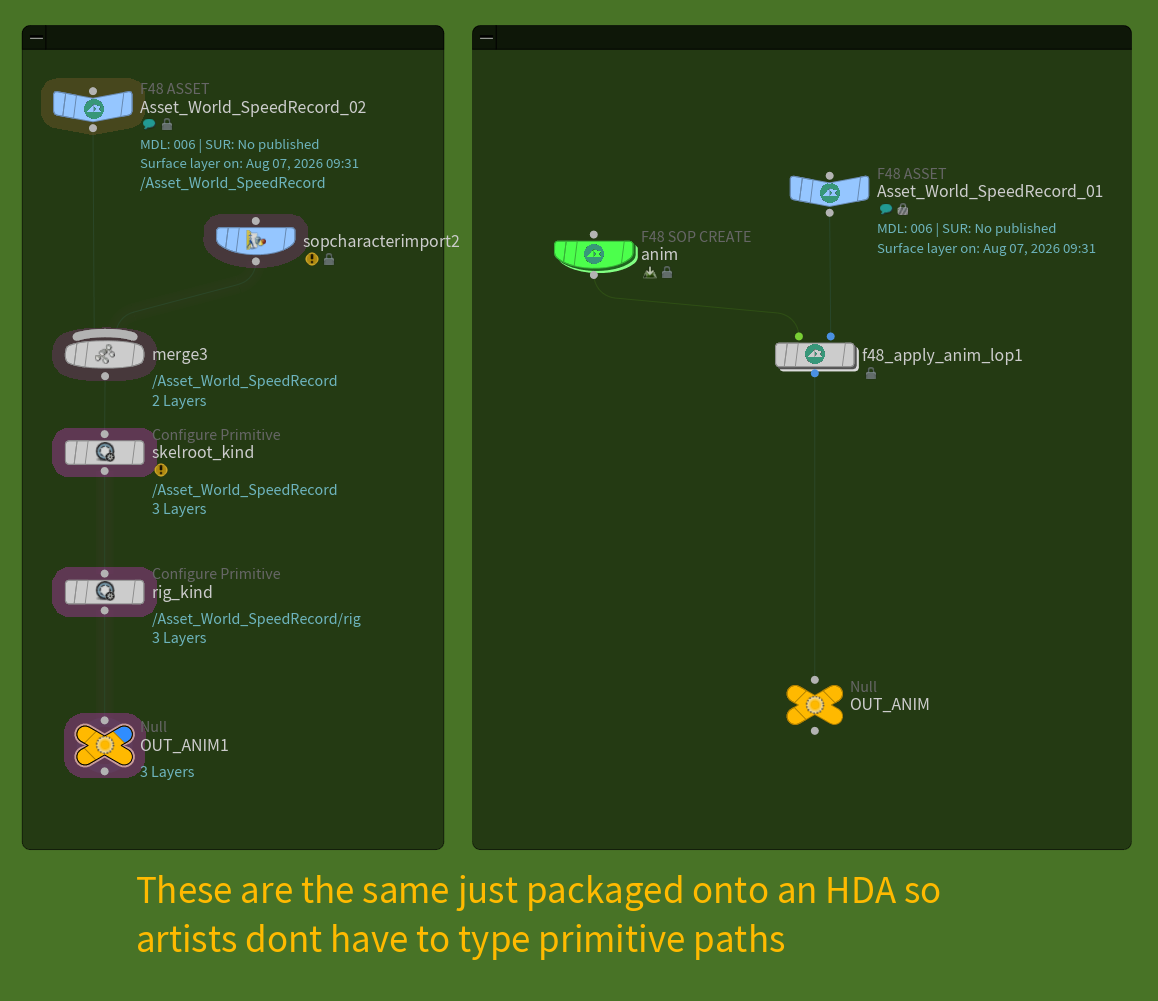
Extracting that animation back into LOPS was deliberately simple. "After animating, you drop an APEX Unpack Character node after your scene-animate, pipe the animated skeleton into a SOP Import Character node in LOPS, and match your primitive paths," de la Garza said. "That overlays the animated skeleton on top of the static USD asset, imposing your opinion over it, and it moves. We packaged this into an HDA called F48_Apply Anim" Because only skeleton data moves through, the handoff stays light.
#kKD4Gjl.is-media-grid {
column-count: 1;
column-gap: 10px;
padding: 10px;
}
#kKD4Gjl .gallery-item {
position: relative;
break-inside: avoid;
border-radius: 0px;
margin-bottom: 10px;
line-height: 0; /* Eliminate extra space */
cursor: pointer;
overflow: hidden;
/* box-shadow: 5px 5px 0px #00000012;*/
}
#kKD4Gjl .gallery-item img {
width: 100%;
height: auto;
transition: .8s all;
margin: 0;
}
#kKD4Gjl .gallery-item .caption {
position: absolute;
bottom: 0;
left: 0;
width: 100%;
background-color: rgba(0, 0, 0, 0.4);
color: #fff;
padding: 12px 15px;
opacity: 0;
transition: all 0.8s ease;
overflow: hidden;
text-overflow: ellipsis;
box-sizing: border-box;
font-family: system-ui, -apple-system, BlinkMacSystemFont, 'Segoe UI', Roboto, Oxygen, Ubuntu, Cantarell, 'Open Sans', 'Helvetica Neue', sans-serif;
font-size: .9em;
font-weight: 200;
line-height: 1.2;
}
#kKD4Gjl .gallery-item .caption h4 {
font-weight: 300;
font-size: 1.1em;
margin: 0 0 0.1em;;
}
#kKD4Gjl .gallery-item:hover .caption {
opacity: 1;
}
#kKD4Gjl .gallery-item .caption {
transform: translateY(100%);
transition: transform 0.5s ease, opacity 0.5s ease;
}
#kKD4Gjl .gallery-item:hover .caption {
transform: translateY(0%);
opacity: 1;
}
#kKD4Gjl .gallery-item .caption {
background-color: #fff;
color: #000;
}
#kKD4Gjl .gallery-item .caption * {
color: #000;
}
@media (max-width: 800px) {
#kKD4Gjl.is-media-grid {column-count: 3;}
}
@media (max-width: 600px) {
#kKD4Gjl.is-media-grid {column-count: 2;}
}
@media (max-width: 400px) {
#kKD4Gjl.is-media-grid {column-count: 1;}
}
.gallery-item .gallery-video-overlay {
width: 100%;
height: 100%;
position: absolute;
top: 0; left: 0;
background: rgba(255,255,255,0.000001);
}
.gallery-item video {
height: auto;
width: 100%;
object-fit: cover;
}
Working on the Lenovo job surfaced a limit in the four-department model: sometimes one
department needed several artists working in different FX elements for the same shot. "We realized we needed to break shots down not just into four departments, but into sub-tasks within a department," Enrique said. "For instance we needed three different people doing different types of FX at the same time, on the same shot, reading the same animation, and merging seamlessly on top of
each other in the USD layer stack."
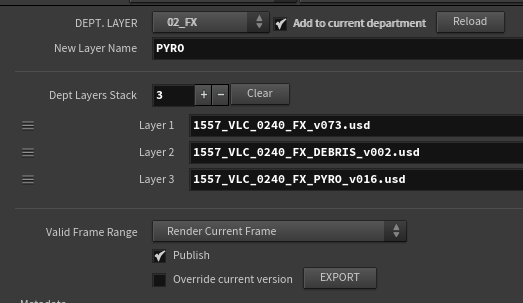
The team improved its F48 Shot Exporter HDA so artists could branch a shot out into a custom
department sublayer. On shot VLC_0240, the FX layer stack was split three ways:
1557_VLC_0240_FX_PYRO
1557 VLC_0240_FX_DEBRIS
1557 VLC_0240_FX_EXPLOSION
Each gets sublayered to compose 1557_VLC_0240_FX. usda, which in turn feeds the main 1557_VLC_0240. usda alongside every other department.
#ETUN8A5.is-media-grid {
column-count: 2;
column-gap: 20px;
padding: 20px;
}
#ETUN8A5 .gallery-item {
position: relative;
break-inside: avoid;
border-radius: 0px;
margin-bottom: 20px;
line-height: 0; /* Eliminate extra space */
cursor: pointer;
overflow: hidden;
/* box-shadow: 5px 5px 0px #00000012;*/
}
#ETUN8A5 .gallery-item img {
width: 100%;
height: auto;
transition: .8s all;
margin: 0;
}
#ETUN8A5 .gallery-item .caption {
position: absolute;
bottom: 0;
left: 0;
width: 100%;
background-color: rgba(0, 0, 0, 0.4);
color: #fff;
padding: 12px 15px;
opacity: 0;
transition: all 0.8s ease;
overflow: hidden;
text-overflow: ellipsis;
box-sizing: border-box;
font-family: system-ui, -apple-system, BlinkMacSystemFont, 'Segoe UI', Roboto, Oxygen, Ubuntu, Cantarell, 'Open Sans', 'Helvetica Neue', sans-serif;
font-size: .9em;
font-weight: 200;
line-height: 1.2;
}
#ETUN8A5 .gallery-item .caption h4 {
font-weight: 300;
font-size: 1.1em;
margin: 0 0 0.1em;;
}
#ETUN8A5 .gallery-item:hover .caption {
opacity: 1;
}
#ETUN8A5 .gallery-item .caption {
transform: translateY(100%);
transition: transform 0.5s ease, opacity 0.5s ease;
}
#ETUN8A5 .gallery-item:hover .caption {
transform: translateY(0%);
opacity: 1;
}
#ETUN8A5 .gallery-item .caption {
background-color: #fff;
color: #000;
}
#ETUN8A5 .gallery-item .caption * {
color: #000;
}
@media (max-width: 800px) {
#ETUN8A5.is-media-grid {column-count: 3;}
}
@media (max-width: 600px) {
#ETUN8A5.is-media-grid {column-count: 2;}
}
@media (max-width: 400px) {
#ETUN8A5.is-media-grid {column-count: 1;}
}
.gallery-item .gallery-video-overlay {
width: 100%;
height: 100%;
position: absolute;
top: 0; left: 0;
background: rgba(255,255,255,0.000001);
}
.gallery-item video {
height: auto;
width: 100%;
object-fit: cover;
}
The other piece was data. "We built the F48 SOP USD Cache, which promotes parameters from the
USD Configure SOP node to help artists configure simulation caches with all the USD structure needed to load them back into LOPs as a GeoClip Sequence or Volume LOP," de la Garza said. "It ensures smooth playback and avoids doubling data on our servers. The sim caches are written once to.bgeo.sc files and referenced directly by the USD."
#iDSvSpw.is-media-grid {
column-count: 1;
column-gap: 10px;
padding: 10px;
}
#iDSvSpw .gallery-item {
position: relative;
break-inside: avoid;
border-radius: 0px;
margin-bottom: 10px;
line-height: 0; /* Eliminate extra space */
cursor: pointer;
overflow: hidden;
/* box-shadow: 5px 5px 0px #00000012;*/
}
#iDSvSpw .gallery-item img {
width: 100%;
height: auto;
transition: .8s all;
margin: 0;
}
#iDSvSpw .gallery-item .caption {
position: absolute;
bottom: 0;
left: 0;
width: 100%;
background-color: rgba(0, 0, 0, 0.4);
color: #fff;
padding: 12px 15px;
opacity: 0;
transition: all 0.8s ease;
overflow: hidden;
text-overflow: ellipsis;
box-sizing: border-box;
font-family: system-ui, -apple-system, BlinkMacSystemFont, 'Segoe UI', Roboto, Oxygen, Ubuntu, Cantarell, 'Open Sans', 'Helvetica Neue', sans-serif;
font-size: .9em;
font-weight: 200;
line-height: 1.2;
}
#iDSvSpw .gallery-item .caption h4 {
font-weight: 300;
font-size: 1.1em;
margin: 0 0 0.1em;;
}
#iDSvSpw .gallery-item:hover .caption {
opacity: 1;
}
#iDSvSpw .gallery-item .caption {
transform: translateY(100%);
transition: transform 0.5s ease, opacity 0.5s ease;
}
#iDSvSpw .gallery-item:hover .caption {
transform: translateY(0%);
opacity: 1;
}
#iDSvSpw .gallery-item .caption {
background-color: #fff;
color: #000;
}
#iDSvSpw .gallery-item .caption * {
color: #000;
}
@media (max-width: 800px) {
#iDSvSpw.is-media-grid {column-count: 3;}
}
@media (max-width: 600px) {
#iDSvSpw.is-media-grid {column-count: 2;}
}
@media (max-width: 400px) {
#iDSvSpw.is-media-grid {column-count: 1;}
}
.gallery-item .gallery-video-overlay {
width: 100%;
height: 100%;
position: absolute;
top: 0; left: 0;
background: rgba(255,255,255,0.000001);
}
.gallery-item video {
height: auto;
width: 100%;
object-fit: cover;
}
Lighting and look development is the last step of the CG pipeline, and the one where everything comes back together. The F48 Shot HDA loads every department's work, and lighting artists handle final looks: variant switching for assets, custom shader overrides, camera adjustments.
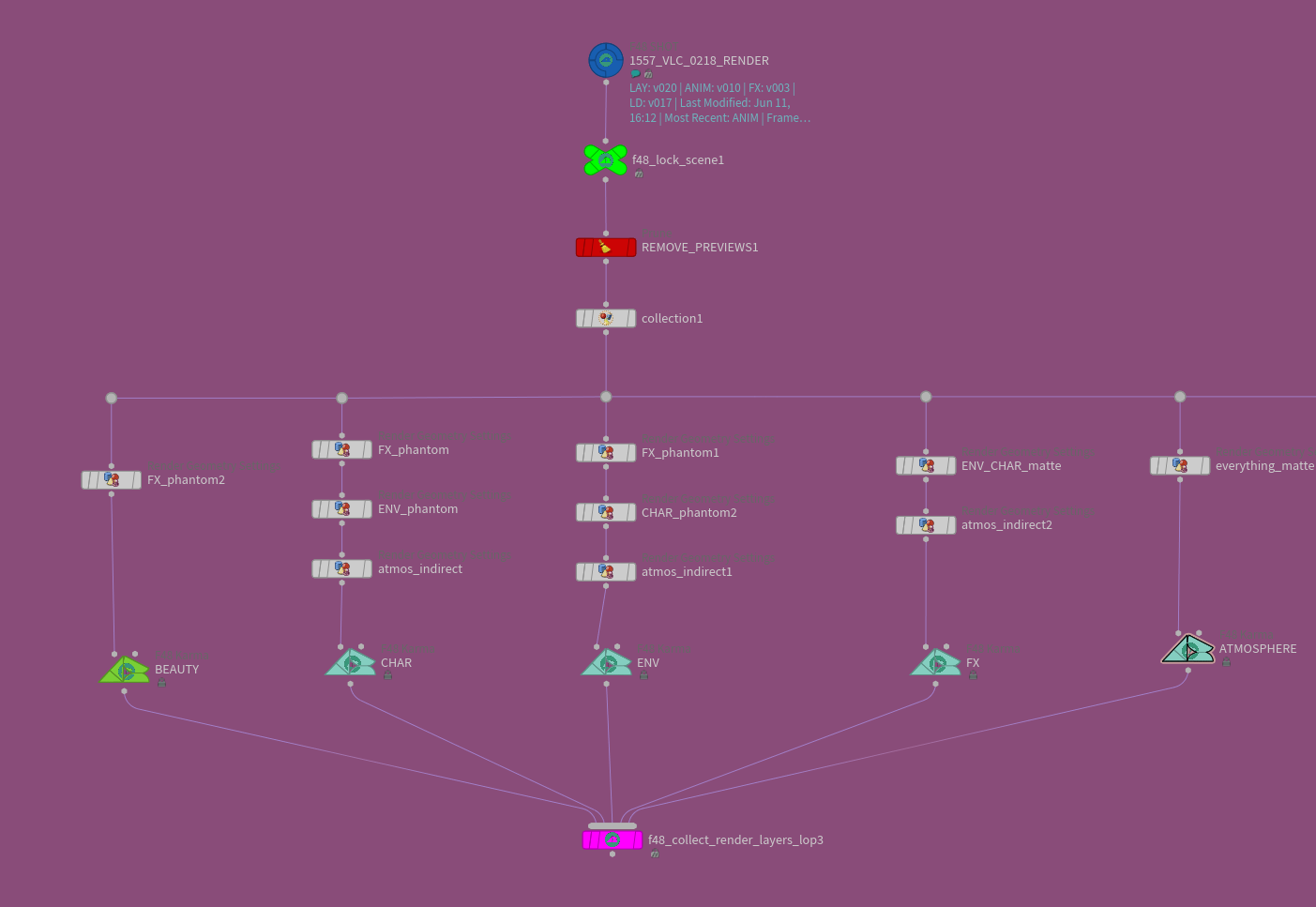
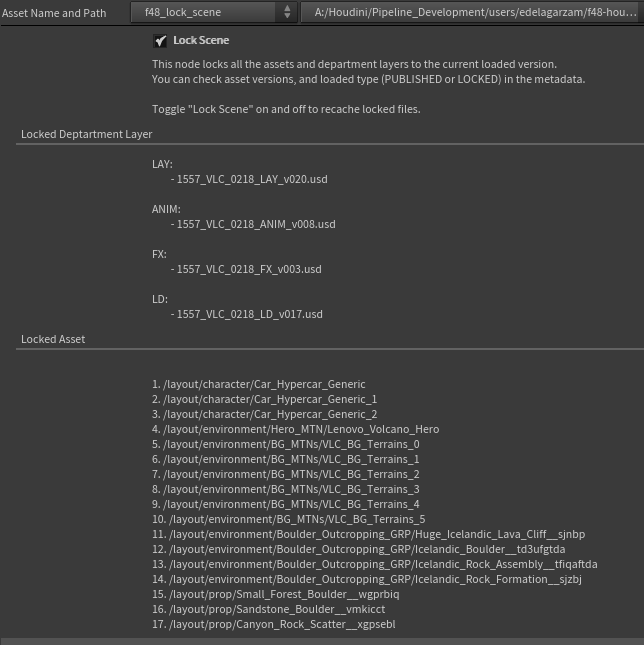
When a shot is ready, it's exported and reloaded with the F48 Shot HDA set to "RENDER" mode, which loads the entire layer stack across all departments, locking the current published versions of each so nothing gets overwritten mid-render. From there the team branches out render layers using a combination of render geometry settings and prune nodes, collects them, and sends them to the render farm with Husk.
#vbz2JBx.is-media-grid {
column-count: 2;
column-gap: 10px;
padding: 10px;
}
#vbz2JBx .gallery-item {
position: relative;
break-inside: avoid;
border-radius: 0px;
margin-bottom: 10px;
line-height: 0; /* Eliminate extra space */
cursor: pointer;
overflow: hidden;
/* box-shadow: 5px 5px 0px #00000012;*/
}
#vbz2JBx .gallery-item img {
width: 100%;
height: auto;
transition: .8s all;
margin: 0;
}
#vbz2JBx .gallery-item .caption {
position: absolute;
bottom: 0;
left: 0;
width: 100%;
background-color: rgba(0, 0, 0, 0.4);
color: #fff;
padding: 12px 15px;
opacity: 0;
transition: all 0.8s ease;
overflow: hidden;
text-overflow: ellipsis;
box-sizing: border-box;
font-family: system-ui, -apple-system, BlinkMacSystemFont, 'Segoe UI', Roboto, Oxygen, Ubuntu, Cantarell, 'Open Sans', 'Helvetica Neue', sans-serif;
font-size: .9em;
font-weight: 200;
line-height: 1.2;
}
#vbz2JBx .gallery-item .caption h4 {
font-weight: 300;
font-size: 1.1em;
margin: 0 0 0.1em;;
}
#vbz2JBx .gallery-item:hover .caption {
opacity: 1;
}
#vbz2JBx .gallery-item .caption {
transform: translateY(100%);
transition: transform 0.5s ease, opacity 0.5s ease;
}
#vbz2JBx .gallery-item:hover .caption {
transform: translateY(0%);
opacity: 1;
}
#vbz2JBx .gallery-item .caption {
background-color: #fff;
color: #000;
}
#vbz2JBx .gallery-item .caption * {
color: #000;
}
@media (max-width: 800px) {
#vbz2JBx.is-media-grid {column-count: 3;}
}
@media (max-width: 600px) {
#vbz2JBx.is-media-grid {column-count: 2;}
}
@media (max-width: 400px) {
#vbz2JBx.is-media-grid {column-count: 1;}
}
.gallery-item .gallery-video-overlay {
width: 100%;
height: 100%;
position: absolute;
top: 0; left: 0;
background: rgba(255,255,255,0.000001);
}
.gallery-item video {
height: auto;
width: 100%;
object-fit: cover;
}
#xKJW25Y.is-media-grid {
column-count: 1;
column-gap: 10px;
padding: 10px;
}
#xKJW25Y .gallery-item {
position: relative;
break-inside: avoid;
border-radius: 0px;
margin-bottom: 10px;
line-height: 0; /* Eliminate extra space */
cursor: pointer;
overflow: hidden;
/* box-shadow: 5px 5px 0px #00000012;*/
}
#xKJW25Y .gallery-item img {
width: 100%;
height: auto;
transition: .8s all;
margin: 0;
}
#xKJW25Y .gallery-item .caption {
position: absolute;
bottom: 0;
left: 0;
width: 100%;
background-color: rgba(0, 0, 0, 0.4);
color: #fff;
padding: 12px 15px;
opacity: 0;
transition: all 0.8s ease;
overflow: hidden;
text-overflow: ellipsis;
box-sizing: border-box;
font-family: system-ui, -apple-system, BlinkMacSystemFont, 'Segoe UI', Roboto, Oxygen, Ubuntu, Cantarell, 'Open Sans', 'Helvetica Neue', sans-serif;
font-size: .9em;
font-weight: 200;
line-height: 1.2;
}
#xKJW25Y .gallery-item .caption h4 {
font-weight: 300;
font-size: 1.1em;
margin: 0 0 0.1em;;
}
#xKJW25Y .gallery-item:hover .caption {
opacity: 1;
}
#xKJW25Y .gallery-item .caption {
transform: translateY(100%);
transition: transform 0.5s ease, opacity 0.5s ease;
}
#xKJW25Y .gallery-item:hover .caption {
transform: translateY(0%);
opacity: 1;
}
#xKJW25Y .gallery-item .caption {
background-color: #fff;
color: #000;
}
#xKJW25Y .gallery-item .caption * {
color: #000;
}
@media (max-width: 800px) {
#xKJW25Y.is-media-grid {column-count: 3;}
}
@media (max-width: 600px) {
#xKJW25Y.is-media-grid {column-count: 2;}
}
@media (max-width: 400px) {
#xKJW25Y.is-media-grid {column-count: 1;}
}
.gallery-item .gallery-video-overlay {
width: 100%;
height: 100%;
position: absolute;
top: 0; left: 0;
background: rgba(255,255,255,0.000001);
}
.gallery-item video {
height: auto;
width: 100%;
object-fit: cover;
}
For all of it, Enrique is candid that the transition was not painless. "Shifting the whole team's mindset about how work gets produced was challenging, and some of how USD is implemented might not be intuitive for everyone: managing time samples, subframe sampling for motion blur, merge order and style differing from SOPs, xform behavior when SOP-modifying versus LOP-importing, and asset
resolvers .."
Enrique's advice to other small studios is not to be scared off. "When you're making a big change, being overwhelmed is normal, but that shouldn't discourage you from trying. You don't have to commit 100% like we did, instead start little by little. Find and isolate the areas of your workflow that could benefit from USD and Solaris. There are always ways to cut corners, and it comes down to your needs as a studio." He laughs: "We still don't have a custom asset resolver."