

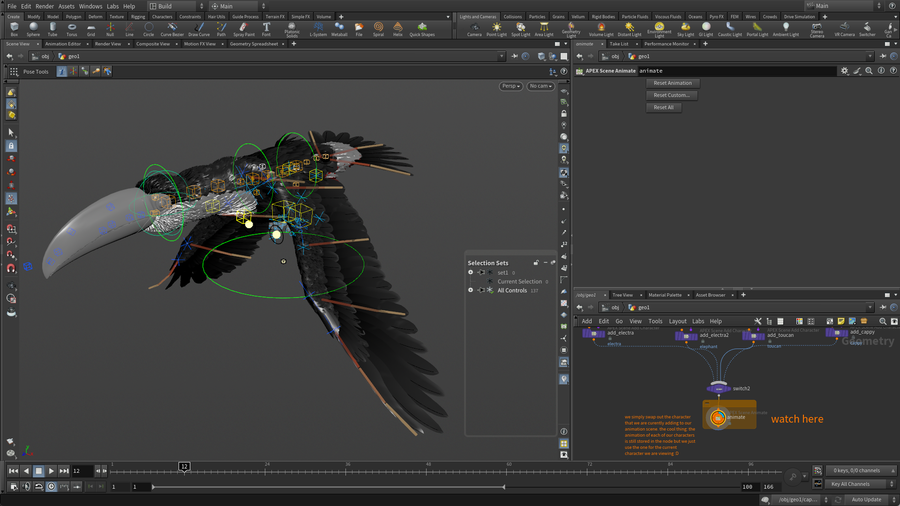


Character Switching
Film/TV
Components can easily switch between different rigs based on their tags. Here are four rigs that seem quite different but they use the same rig components which were set up by following the tags.
CREATED BY

COMMENTS
UtilitasArts 1 year, 8 months ago |
Thanks a lot for creating all these example files!
They are extremely valuable for learning!
bladel.timothy 1 year, 8 months ago |
Unreal!
muviing 1 year, 8 months ago |
SOSOSOSO SO Thank you. So valuable and great contents.
anon_user_86835697 1 year, 7 months ago |
here the mirroring in the apex scen animate doesn't work correctly either. would be nice to know why
w007s 1 year, 6 months ago |
Why is there no example with Gears? The most interesting part is missing)
1811cc 1 year, 5 months ago |
+1
Dronson 1 year, 6 months ago |
Absolutly agree, we are very interesting Gears exapmple! Please share Gears!
NNNenov 1 year, 1 month ago |
hi there, it works at first, but if I change the switch at the top, everything stops working, could something have changed with a newer version of apex?
gridmood 1 year ago |
Hi, I tried the check animation and the characters don't move as shown in the tutorial.
I notice the detail attribute "constraintbookmarks" seems not in the stash while attribcopy is defined inside the check_animation node trying to extract that from the stash. Would this be the reason of the animations not working please?
gridmood 1 year ago |
I found out how to make the animations work. It's not about the "constraintbookmarks" I mentioned above as I see a couple of other tutorials sample files have that attribute missing in the stash but still works.
I added a "APEX Scene Invoke" node after the animate node, then click on the "Output All Character Shapes" button. The animations will then work. If you don't want to click that button every time you switch to another character provided, you can add the entries inside the same sceneinvoke node. The namings are great and standardized so it's an easy task.
Hope this helps.
mgh.ghasemi.mg 11 months ago |
When I open the file with 20.5.572 the character legs are messed up. and the animation is backward.
maximumsproductions 3 months, 3 weeks ago |
Animation backward, therefore broken 20.5.684?
Is there some forward compatible solution to APEX? Or is this just part of beta APEX kinda breaking? Reloading the components doesn't seem to help unless that's also due to the stashed nature of the animate node.
Suggest in future with this stuff to upload specific version, makes me feel bad for authors amazing data setup. Every comment I read under APEX tutorials is XYZ doesn't work in X version haha.
Mike_A 2 months, 2 weeks ago |
It's incredibly disappointing that these potentially very useful files are not updated to be compatible with the current version of Houdini. Particularly so when APEX was declared 'production ready' as of version 21. Please make the changes required and re-upload. Thanks.
Please log in to leave a comment.