I am aware that Photon Map Generation is not currently supported for network renders. However, is it also not possible to render using PBR and a caustic photon map?
I've tried to do so and only get dark, caustic-less shadows in return. The caustic photon map is in an accessible location for both machines, I even tested the location by writing the output image in the same location as the photon map. If I turn off network rendering, the image comes out with caustics from the photon map. Any solutions?
Network Render of Caustics
8413 12 1-

- heydabop
- Member

- 203 posts
- Joined:
- Offline
-

- Siavash Tehrani
- Member

- 735 posts
- Joined: July 2005
- Offline
Hey heydabob. I'm sorry I don't know the solution to your problem, but what about just raytracing the caustics? Have you looked into that? Caustics-wise in Houdini, photons seem really clunky to me. It's very slow to generate respectable looking caustic maps, and they're a bit unreliable, giving odd results at times.
You may be better off raytracing caustics, but it really depends on the lighting in your scene.
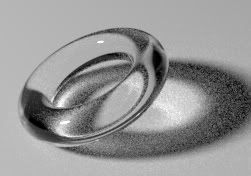
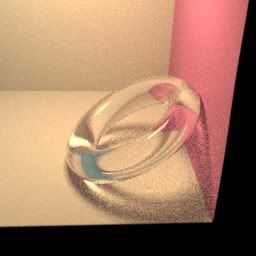
Example:I tried to replicate the torus pic from your blog, and even with 40x40 pixel samples the caustics are still quite noisy. Then a different scene rendered with only 16x16 samples and the noise is actually about the same.
If you have a lot of RAM (only 2gigs here), getting the noise down should be doable and may actually still give you faster renders than if you tried to generate a good-looking caustic maps.
You may be better off raytracing caustics, but it really depends on the lighting in your scene.
Example:I tried to replicate the torus pic from your blog, and even with 40x40 pixel samples the caustics are still quite noisy. Then a different scene rendered with only 16x16 samples and the noise is actually about the same.
If you have a lot of RAM (only 2gigs here), getting the noise down should be doable and may actually still give you faster renders than if you tried to generate a good-looking caustic maps.
-
- heydabop
- Member
- 203 posts
- Joined:
- Offline
-
- Siavash Tehrani
- Member
- 735 posts
- Joined: July 2005
- Offline
Sorry, I wrote it kinda hurried. I don't think it's a documented feature. Add these rendering parameters to mantra:
Allowable Paths (vm_pbrpathtype)
Color Limit (vm_colorlimit)
PBR Min Reflection Ratio (vm_pbrreflectratio)
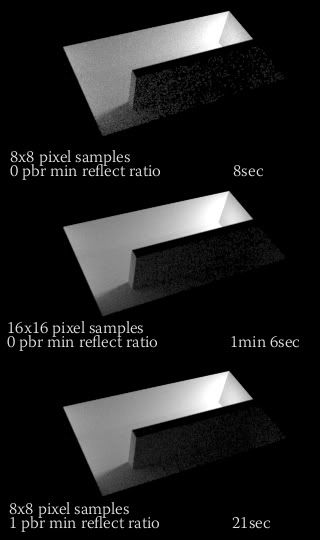
Allowable Paths lets you specify caustics on top of the diffuse and specular paths. Color Limit dials down light reflection/refraction/caustics, so they are not insanely bright when rendering with PBR. Min Reflection Ratio can help anti-alias dark areas of the render, and do it more efficiently than simply cranking up pixel samples. Aside from that I noticed that it also amplifes caustics and helps anti-alias them, both of which mean you don't have to decrease the color limit quite as much. Takes a render time hit though. Valid range seems to be 0-1, even though the slider goes all the way to 10.
Hope this helps.
Allowable Paths (vm_pbrpathtype)
Color Limit (vm_colorlimit)
PBR Min Reflection Ratio (vm_pbrreflectratio)
Allowable Paths lets you specify caustics on top of the diffuse and specular paths. Color Limit dials down light reflection/refraction/caustics, so they are not insanely bright when rendering with PBR. Min Reflection Ratio can help anti-alias dark areas of the render, and do it more efficiently than simply cranking up pixel samples. Aside from that I noticed that it also amplifes caustics and helps anti-alias them, both of which mean you don't have to decrease the color limit quite as much. Takes a render time hit though. Valid range seems to be 0-1, even though the slider goes all the way to 10.
Hope this helps.
-
- heydabop
- Member
- 203 posts
- Joined:
- Offline
-
- Siavash Tehrani
- Member
- 735 posts
- Joined: July 2005
- Offline
-
- heydabop
- Member
- 203 posts
- Joined:
- Offline
-
- Siavash Tehrani
- Member
- 735 posts
- Joined: July 2005
- Offline
-
- heydabop
- Member
- 203 posts
- Joined:
- Offline
-
- Siavash Tehrani
- Member
- 735 posts
- Joined: July 2005
- Offline
-
- heydabop
- Member
- 203 posts
- Joined:
- Offline
-
- Siavash Tehrani
- Member
- 735 posts
- Joined: July 2005
- Offline
I think that's the sort of scene that's going to be difficult to use with the raytrace caustics. Ideally you'll have large light sources and lots of light bouncing around. It worked very well with the cornell box I made for example.
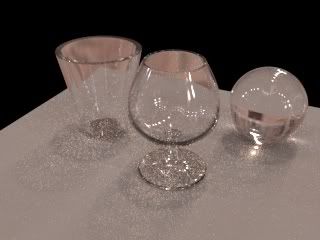
Here's a couple of renders with HDR maps. The first map has a lot of small intense light sources, and the caustics throw a ton of noise into the scene that's very difficult to anti-alias away. The second map has the sky as the main lightsource and noise isn't too severe.
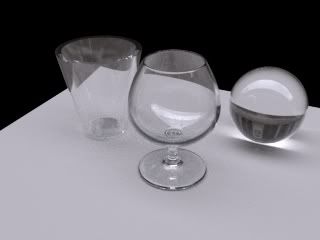
Sorry I only included the first HDR map with the file, other one was too big. There was a pack of Houdini-ready HDR maps in .rat format on the odforce wiki, but I can't find it at the moment. :?
Here's a couple of renders with HDR maps. The first map has a lot of small intense light sources, and the caustics throw a ton of noise into the scene that's very difficult to anti-alias away. The second map has the sky as the main lightsource and noise isn't too severe.
Sorry I only included the first HDR map with the file, other one was too big. There was a pack of Houdini-ready HDR maps in .rat format on the odforce wiki, but I can't find it at the moment. :?
-
- heydabop
- Member
- 203 posts
- Joined:
- Offline
-
- Quick Links