
There is no "Hide when" or something similar. I suppose the "onoff" option is it? But it doesn't seem to support syntax like "a == 1".
Show/hide handles for custom HDA by a parameter's value
1556 2 1

-
- raincole
- Member

- 737 posts
- Joined: Aug. 2019
- Offline
I'd like to show/hide some handles for my custom HDA according to a parameter's value. For example, show one handle when parameter a = 0 and show another when a = 1, etc.
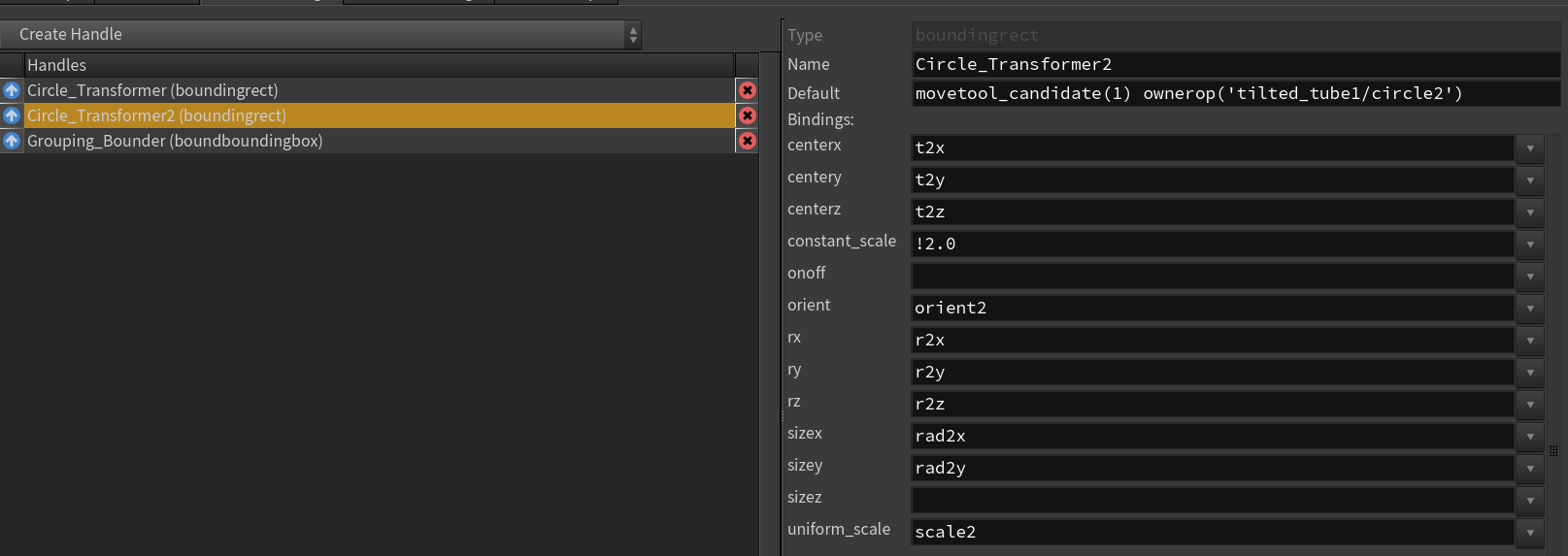
There is no "Hide when" or something similar. I suppose the "onoff" option is it? But it doesn't seem to support syntax like "a == 1".
There is no "Hide when" or something similar. I suppose the "onoff" option is it? But it doesn't seem to support syntax like "a == 1".
-

- vikus
- Member

- 255 posts
- Joined: May 2017
- Offline
raincole
I suppose the "onoff" option is it? But it doesn't seem to support syntax like "a == 1".
The onoff parm. is only there to disable the handle, so it will appear grayed out if the value is not 1.
You can bind handles through viewer states, then define any logic there (Type Properties / Interactive / State Script).
Image Not Found
Edited by vikus - April 12, 2024 06:05:10
-

- SWest
- Member

- 313 posts
- Joined: Oct. 2016
- Offline
-
- Quick Links