
Rob Verweij
rove
About Me
I'm a self-taught 2D and 3D CGI enthusiast with a lifelong love for art and a particular passion for bringing nature to life. My journey into 3D began in the 90s with LightWave 3D, but I truly found my creative home with SideFX Houdini in 2009. I am constantly inspired by the world around me and dri... more
I'm a self-taught 2D and 3D CGI enthusiast with a lifelong love for art and a particular passion for bringing nature to life. My journey into 3D began in the 90s with LightWave 3D, but I truly found my creative home with SideFX Houdini in 2009. I am constantly inspired by the world around me and driven to create art that capture its beauty and power. I'm passionate about learning and pushing my skills to create compelling 2D and 3D art. less
EXPERTISE
Hobbyist
Connect
LOCATION
Dordrecht,
Netherlands
WEBSITE
Houdini Skills
INTERMEDIATE
Procedural Modeling | Environments | Digital Assets | Motion Editing | Animation | Solaris | Mantra | Karma | Lighting | Pyro FX | Fluids | Destruction FX | Realtime FX | VEX
BEGINNER
Character Rigging | Hair & Fur | Cloth | Crowds | Muscles | PDG | Python
Availability
Not Specified
Recent Forum Posts
Flip sim paths May 28, 2026, 4:50 p.m.
Avoid using the sourcing input for force redirection. The sourcing step in FLIP is primarily designed for injecting new particles or adding a one-time initial velocity volume at birth, not for steering active simulation particles.
There are a couple of available options:
As you mentioned use a pop curve force. This might be best if you're aiming for a guided flow.
If you just want particles to completely avoid a specific area / volume (like an invisible boulder or a dead zone), don't use forces at all. Use a Static Object or standard collision volume, and make sure it is invisible at render time.
If you want particles to actively 'run' away from a specific area, a POP Attract (with negative force which basically turns your pop attract into a "POP Repel") with a bounding box/spherical mask might just be it. I think that would be incredibly efficient.
There are a couple of available options:
As you mentioned use a pop curve force. This might be best if you're aiming for a guided flow.
If you just want particles to completely avoid a specific area / volume (like an invisible boulder or a dead zone), don't use forces at all. Use a Static Object or standard collision volume, and make sure it is invisible at render time.
If you want particles to actively 'run' away from a specific area, a POP Attract (with negative force which basically turns your pop attract into a "POP Repel") with a bounding box/spherical mask might just be it. I think that would be incredibly efficient.
can i do all my study from tutorials in one project? May 22, 2026, 11:36 a.m.
When I experiment on a specific thing I usually tend to drop it all in one save file/project directory.
Currently I'm studying/experimenting with SOP flips. I have a SOP Flip fundamentals save file with experiments and stuff I found in the documentation. You can basically pick any approach you like though. There's no written rule as to how to approach studying/experimenting with anything within Houdini. Tbh i do have s project dir I called "Liquid FX" in which I will save several personal and specific SOP Flip experiments.
Currently I'm studying/experimenting with SOP flips. I have a SOP Flip fundamentals save file with experiments and stuff I found in the documentation. You can basically pick any approach you like though. There's no written rule as to how to approach studying/experimenting with anything within Houdini. Tbh i do have s project dir I called "Liquid FX" in which I will save several personal and specific SOP Flip experiments.
[Showcase] Dynamic Multi-Fluid Color Mixing in H21 SOP FLIP May 21, 2026, 11:38 p.m.
Hey everyone,
Wanted to share a recent lookdev experiment focusing on multi-fluid property propagation within the modern Houdini 21 SOP-based FLIP pipeline. The goal was to merge two independent, stylized emitter streams early in the setup while keeping a razor-sharp attribute boundary during violent fluid churning, splashing, and shearing.
The Setup Architecture
I focused on simplicity and I wanted to handle the logic natively within a single execution stream:
Early Point Grouping & Merging
Stream A (Red) and Stream B (Black) are generated as independent polygonal geometry blocks before entering a single merge node.
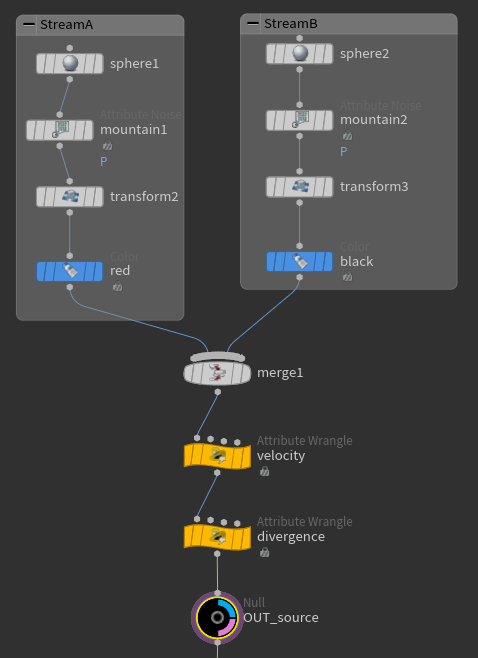
The H21 Multi-Wire Trunk
The points feed directly into custom velocity and divergence attribute wrangles before being piped into the FLIP sim. From there, the data flows seamlessly down through the native multi-pass pipeline (flipcontainer ➔ flipboundary ➔ flipcollide ➔ flipsolver).
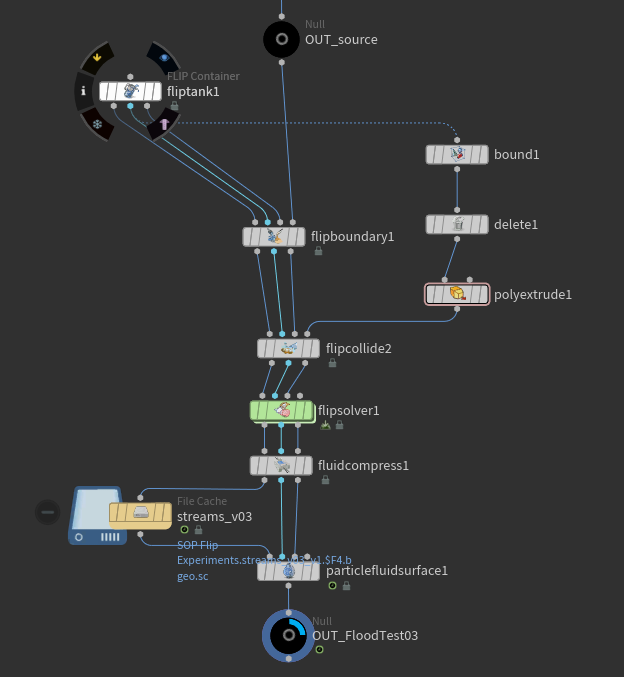
Solver Configuration
To prevent the attributes from washing out or diluting into a uniform gray soup as the fluids sheared, I disabled Particle Narrow Band and Reseeding
Meshing & Solaris Lookdev
The fluid particles were cached out through a fluidcompress loop and converted back to a unified geometry surface via particlefluidsurface.
In Solaris, the setup utilizes a single master MaterialX Standard Surface shader (fluid_mix_surface) rather than complex multi-material blending nodes.

The Trap: Using a standard mtlxgeompropvalue node targeted at Cd will return blank values in LOPs because sopimport automatically translates point data to native USD primvars.
The Fix: Setting the geometry property reader explicitly to target displayColor instantly grabs the incoming vertex colors.
The data stream feeds directly into an mtlxrampcolor node, mapping the absolute mathematical point values directly to the final colors: translucent Deep Rich Crimson Red and Amber Honey.
Rendered completely in Karma XPU. Let me know what you think of it!
Wanted to share a recent lookdev experiment focusing on multi-fluid property propagation within the modern Houdini 21 SOP-based FLIP pipeline. The goal was to merge two independent, stylized emitter streams early in the setup while keeping a razor-sharp attribute boundary during violent fluid churning, splashing, and shearing.
The Setup Architecture
I focused on simplicity and I wanted to handle the logic natively within a single execution stream:
Early Point Grouping & Merging
Stream A (Red) and Stream B (Black) are generated as independent polygonal geometry blocks before entering a single merge node.
The H21 Multi-Wire Trunk
The points feed directly into custom velocity and divergence attribute wrangles before being piped into the FLIP sim. From there, the data flows seamlessly down through the native multi-pass pipeline (flipcontainer ➔ flipboundary ➔ flipcollide ➔ flipsolver).
Solver Configuration
To prevent the attributes from washing out or diluting into a uniform gray soup as the fluids sheared, I disabled Particle Narrow Band and Reseeding
Meshing & Solaris Lookdev
The fluid particles were cached out through a fluidcompress loop and converted back to a unified geometry surface via particlefluidsurface.
In Solaris, the setup utilizes a single master MaterialX Standard Surface shader (fluid_mix_surface) rather than complex multi-material blending nodes.
The Trap: Using a standard mtlxgeompropvalue node targeted at Cd will return blank values in LOPs because sopimport automatically translates point data to native USD primvars.
The Fix: Setting the geometry property reader explicitly to target displayColor instantly grabs the incoming vertex colors.
The data stream feeds directly into an mtlxrampcolor node, mapping the absolute mathematical point values directly to the final colors: translucent Deep Rich Crimson Red and Amber Honey.
Rendered completely in Karma XPU. Let me know what you think of it!