
Suggestions for the new version of Copernicus. These are obvious, but perhaps worth repeating.
1) We really need geometry rasterization with a soft alpha channel edge based on the pixel/voxel fill rate of the passing edge, similar to antialiasing. Currently, rasterization is very coarse, requiring quadruple resolution and then resampling, which becomes very slow if there's animation and you want a resolution greater than 1k. And without resampling, it looks very sloppy.
2) We also need a separate node for FXAA.
3) We really want convenient use of raster and vector masks. Using Texture Paint SOP is inconvenient; you have to jump between contexts, create two screens, draw in one, look in the other, and try to hit the right spot. The same goes for vector masks from Curve. You have to do it through SOP with two screens. It's very, very inconvenient. I'd like to take things a step further and create masks directly in COP, preferably over the visible source.
4) Choosing fonts for text. Copernicus is so good and begs to be used that the lack of a font preview is a pain.
Suggestions for the new version of Copernicus.
709 2 1
-
- Gaalvk
- Member

- 58 posts
- Joined: March 2025
- Offline
-

- jlait
- Staff

- 7047 posts
- Joined: July 2005
- Online
Gaalvk
Suggestions for the new version of Copernicus. These are obvious, but perhaps worth repeating.
Thank you. Obvious things are always worth repeating, as we all too often find each other's obvious doesn't line up :>
1) We really need geometry rasterization with a soft alpha channel edge based on the pixel/voxel fill rate of the passing edge, similar to antialiasing. Currently, rasterization is very coarse, requiring quadruple resolution and then resampling, which becomes very slow if there's animation and you want a resolution greater than 1k. And without resampling, it looks very sloppy.
Agreed. I'm not a fan of just doing MSAA or running at quad res, that only gives you a few more shades of grey. I didn't spend all that time working on half-edge coverage lookup tables for PhotoPaint to accept that modern systems should not have correct aliasing :>
But this is a harder problem in the filled case than it is in the curve-rasterization case. So I fear there is no advance in next version; but not because we think it is not important.
2) We also need a separate node for FXAA.
We did look into FXAA, I think we had issues with its HDR support as it is tuned for working with sRGB game output. So to build it in will require more work than just porting the FXAA algorithm... But we may be over complicating things here too?
3) We really want convenient use of raster and vector masks. Using Texture Paint SOP is inconvenient; you have to jump between contexts, create two screens, draw in one, look in the other, and try to hit the right spot. The same goes for vector masks from Curve. You have to do it through SOP with two screens. It's very, very inconvenient. I'd like to take things a step further and create masks directly in COP, preferably over the visible source.
We do have Curve 3D and Mask from Curves, that hopefully lets you deal with vector masks entirely in the COP's 3d viewport? Unless you mean support in the 2d viewport. I do agree that Curve should work in 2d, but that is also looking like a later release.
Getting Texture Mask Paint SOP into COPs is something we are more hopeful to see, however.
4) Choosing fonts for text. Copernicus is so good and begs to be used that the lack of a font preview is a pain.
Annoyingly, I distinctly recall a good font preview back in the SGI days :< The current approach is just frustrating.
I've linked this thread to the existing RFE (105067) for a font preview in SOPs. (If we get it in SOPs, we'll have it in COPs for free)
-
- Gaalvk
- Member
- 58 posts
- Joined: March 2025
- Offline
Thanks, jlait, for remembering us!
The thing with the curve is that it's rasterized as a polygon if we draw a line with straight lines, like a polygon. But if it's a Bezier or Nurbs curve, it's not rasterized, even though it still appears as a closed shape. Essentially, you just need to add a resample inside, but to be honest, I somehow didn't think to create a separate HDA with the resample; I only just now figured it out. Perhaps for slow-witted people like me, it would be better to just embed the resample right away. )))
And yes, users, if you're slow-witted like me and haven't figured out how to draw from an image, there's a shaded template flag in the COP nodes (on the left, not to be confused with the template on the right), and that's what allows you to see the image and draw over it. I realized this very late, unfortunately.
But for Paint, SOP, when diving into SOP, it doesn't work. That's why I want Paint in COP. I, like most people, can't manually move the handles from SOP to COP.
As for anti-aliasing, I'm sure it's better to have anti-aliasing only for SRGB than none at all.
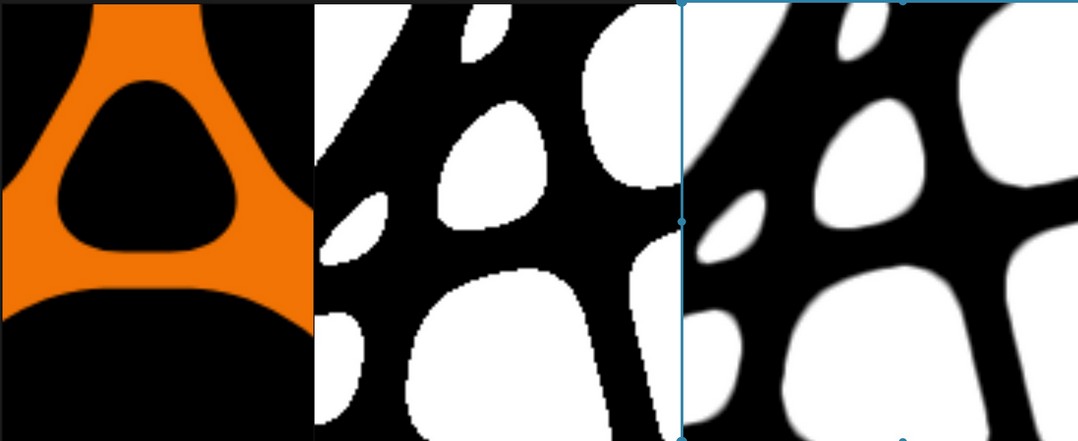
I attached a screenshot from an example I just made – the same resolution files and the same 150x150 pixel cutout to demonstrate anti-aliasing. The orange one is from Cavalry – perfect. The second is rasterization in COP. It moves terribly during animation. The third is manual "anti-aliasing". Blur + remap + one iteration of dilate/erode worked best. But this is only suitable for black and white. My intuition tells me that I could probably play around with the edge search, but the added complexity seems unjustified.
The thing with the curve is that it's rasterized as a polygon if we draw a line with straight lines, like a polygon. But if it's a Bezier or Nurbs curve, it's not rasterized, even though it still appears as a closed shape. Essentially, you just need to add a resample inside, but to be honest, I somehow didn't think to create a separate HDA with the resample; I only just now figured it out. Perhaps for slow-witted people like me, it would be better to just embed the resample right away. )))
And yes, users, if you're slow-witted like me and haven't figured out how to draw from an image, there's a shaded template flag in the COP nodes (on the left, not to be confused with the template on the right), and that's what allows you to see the image and draw over it. I realized this very late, unfortunately.
But for Paint, SOP, when diving into SOP, it doesn't work. That's why I want Paint in COP. I, like most people, can't manually move the handles from SOP to COP.
As for anti-aliasing, I'm sure it's better to have anti-aliasing only for SRGB than none at all.
I attached a screenshot from an example I just made – the same resolution files and the same 150x150 pixel cutout to demonstrate anti-aliasing. The orange one is from Cavalry – perfect. The second is rasterization in COP. It moves terribly during animation. The third is manual "anti-aliasing". Blur + remap + one iteration of dilate/erode worked best. But this is only suitable for black and white. My intuition tells me that I could probably play around with the edge search, but the added complexity seems unjustified.
Edited by Gaalvk - May 1, 2026 13:52:53
-
- Quick Links