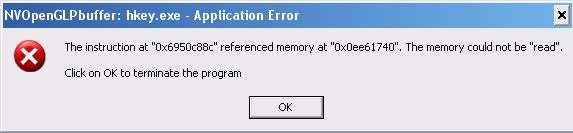
I don't have a clue. Maybe if you would tell us what kind of hardware you have, specially the videocard, which version of windows you are running and which version of houdini you are running, someone might able to help you. For now, it just might not be your day, wrong direction of the wind or who knows…
Operating System: Microsoft Windows Xp Professional (5.1, Build 2600) Language: English (Regional Setting: English) System Manufacturer: Hp Pavilion 061 System Model: PX721AA-ABA M7160N BIOS: Pheonix - Award BIOS v6.00PG Processor: Intel(R) Pentium(R) D CPU 2.80GHz (2 CPUs) Memory: 1022MB RAM Page File: 691MB Used, 1769MB available DirectX Version: DirectX 9.0c (4.09.0000.0904) Display Device: Name: NVIDIA GeForce 7800 GT Manufacturer: NVIDIA Chip Type: GeForce 7800 GT DAC Type: Integrated RAMDAC Approx. Total Memory: 256.0 MB Current Display Mode: 1280 x 1024 (32 bit)(75Hz) Monitor: Plug and Play Monitor Drivers: Main driver: nv4_disp.dll Version: 6.14.0010.7776 (English) Date: 7/16/2005 14:09:00 WHQL Logo'd: No Mini VDD: nv4_mini.sys VDD: n/a DDI Version: 9(or higher) This is what I got.
I posted my specs and I am using the latest build of Houdini. Can I get some help it seems like a great piece of software but I cant use it without your help.
Your machine sounds like it could be a HP laptop ? The thing that jumps out at me is the 1gig of ram you have . You can hardly expect to do much with that when windows will easily eat more than 50%.
The title bar of that dialog box says: “NVOpenGLPbuffer” so the one that's actually crashing is the Nvidia driver. Try adjusting some nvidia driver settings in the advanced mode. For example I use to turn “Threaded optimization” to Off as many time it crashed both Houdini and SynthEyes.
Just sharing my two-cents worth. The Nvidia graphics driver is quite old and not exactly stable (version 77.76) based on reports in the Nvidia forums.
Your Windows XP does not seem to be updated to Service Pack 2 (SP2) or the current Service Pack 3 (SP3), you may want to update it to SP3 for performance improvements and stability. You will find this update in Windows Update (under Start Menu).
Lastly, if after trying out the driver tweaks suggested by digitallysane above does not help, you may want to update the graphics driver to the recent WHQL version (178.24) here: http://www.nvidia.com/object/winxp_178.24_whql.html [nvidia.com] (Please note that this link points to the 32-bit XP version of the driver).
For me, I will usually check if I have updated the machine's Windows XP to at least SP2 (or currently SP3) and the recent WHQL build of Nvidia graphics drivers if I encounter crashes such as those you encountered.