Biome Demo
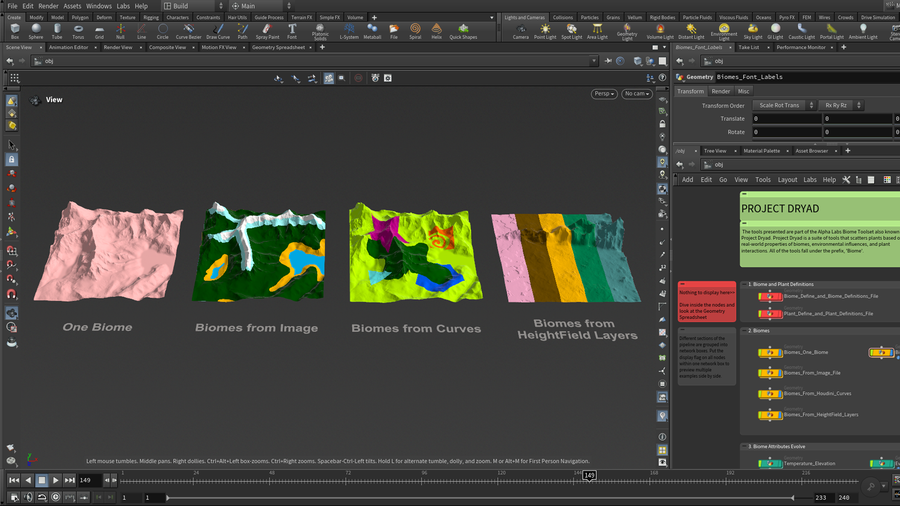
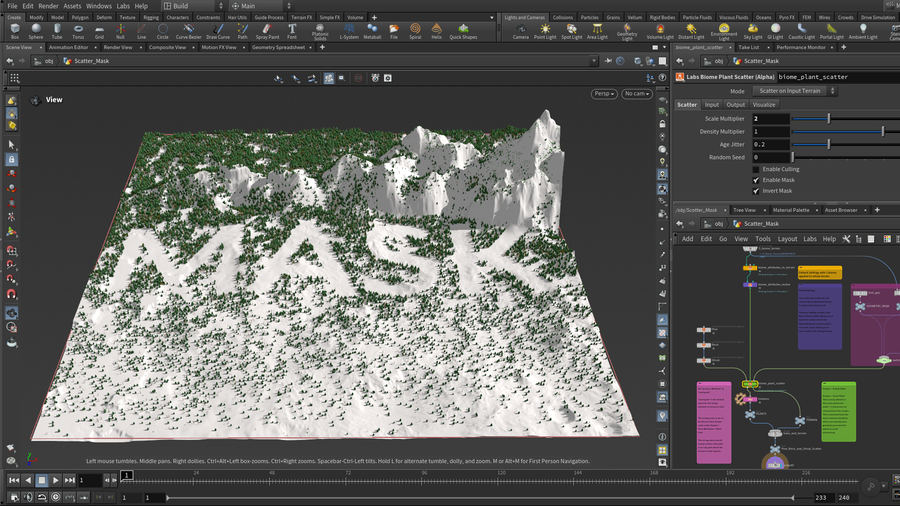
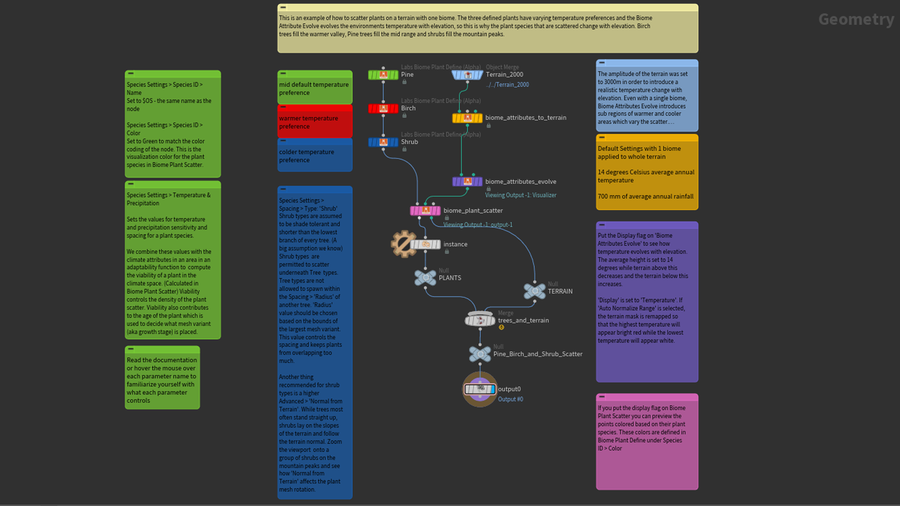
Learn how to scatter plants based on real-world properties of biomes, environmental influences, and plant interactions. This annotated project steps through each tool of the entire suite of beta biome tools released by SideFX Labs.
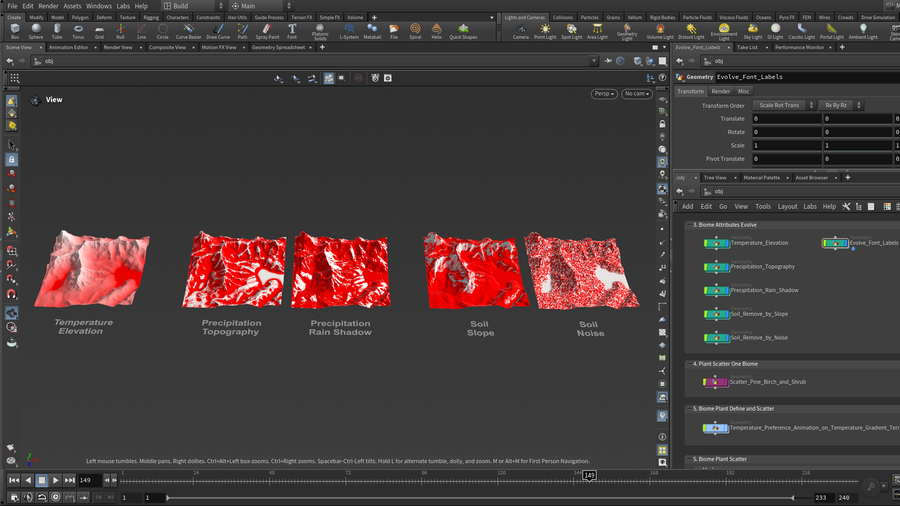
The advanced, scientifically-based system models the underlying processes that occur in nature. Users generate biome regions that control the placement of the initial environmental attributes on a terrain. These attributes are evolved by the terrain shape to reproduce various environmental impacts such as rain shadow, wind exposure, soil quality, and temperature change with elevation. Plants are then matched with areas with their preferred climate and soil conditions, where they compete with nearby plants for resources, and the strongest survive.
Some biome tools require Houdini version 20.5 or newer.
CREATED BY

COMMENTS
spiderbr 1 year, 11 months ago |
Thanks very much for that!
IsStuff 1 year, 10 months ago |
I gave the tools a good go a few months ago. one thing I did at the end that I wished I did sooner was test my plants in a grid with temperature rising in X and precipitation rising in Z. this simple grid with not too many plants scattered showed me why some plants were not covering areas I thought they should. I could see where there were places where no plant would grow and when I blurred values in temperature and precipitation, it made inhospitable areas. I ended up tweaking some generic shrubs to fill in areas like that. Perfect for debugging
TravisFX 1 year, 6 months ago |
Hi Bailey, I'm going through the example scene and I'm having trouble getting the instanced plants into Solaris from the SOP level. I have a hunch it has something to do with the way the instance paths are assigned to the points, or @instancepath attrib. When using the Plant Definition node and sourcing from disk it generates a path to the asset on disk, VS sourcing from a merge node it generates an op:* path to the imported assets. When merging in the instances using the direct file path to the asset, soloraris returns an error, but using the define plants from merge it seems to work fine.
Example:
Source "From Directory" @instancepath
= F:/git/SideFx/SideFXLabsExamples/projects/dryad/alpha/biome_demo/assets/mesh/SM_Alpine_Forest_Shrub_Growth_1.fbx
Source "From Merge Path" *Done inside of a lops Create Sop Node with megascan assets*
= op:/obj/Scatter/lopnet1/sopcreate1/sopnet/create/Var11_LOD0
Do you think an update to the Biome toolkit Example scene can include a Solaris setup?
Thanks!
baileyh 1 year, 5 months ago |
Hi Travis,
Good find. It seems the instanced assets in Solaris will only work with operator paths or usd files. I will fix the referenced geometry and add a Solaris setup to the updated file. Thanks for bringing it to my attention.
Thanks,
Bailey
Aten 4 months, 2 weeks ago |
when I load either of those scenes I get a ton of warnings about 'Ignoring data for locked node:...' and no trees are visible. Also the HDA for plant definitions seems to have errors I am on latest labs and Houdini 21.0.631
cheers
baileyh 4 months ago |
Hi Aten,
Weird. There is no locked node in the hip file. plant define, plant definitions file, and plant scatter have all upgraded to minor version 1.3. I've double checked the biome demo hip file and I see trees and no warnings on my machine but I'll have another developer double check on their machine. The tree assets are no longer embedded in the plant define hda so if you are opening an older hip file that uses opdef: references, you'll either need to downgrade plant_define to version 1.2 or preferably use version 1.3 and change the file path to point to assets in $SIDEFXLABS/geo.
If there are others seeing similar issues, please leave a comment.
-Bailey
baileyh 4 months ago |
Another dev confirmed there were trees in the file. He did run into a segmentation fault and some UI warnings opening this 21.0.631 hip file in H22 but all was well after opening the file the second time.
tto-houdini 4 months ago |
Hey Bailey,
Thank you so much for the breakdown of these tools, I have been trying to figure out how to best use them! Is the practice file for Houdini 21.0.631? I am on 21.0.512, would there be any adaptability for that Houdini version? When I did open the file I got a bunch of errors and the tree references weren't working.
One major step I am held up on is the biome region assign, I can't see the guide geometry and it gets stuck on a cook. Would my HF be too dense? I tried the different versions of the tool but for every one of them it gets stalled out on the guide geometry cook.
Thank you for any help!
Charles
baileyh 3 months, 3 weeks ago |
Hi Charles,
Do you have the latest Daily Build of the SideFX Labs package installed? (21.0.744 and up should work) I'm not noticing any problems when opening the file with an older Houdini version 21.0.462, so .512 should be fine.
For Biome Region Assign, try increasing the Grid Spacing if Division Mode is set to By Size, or decrease the Grid Samples if Division Mode is set to By Axis. The Biome Region Assign output can be much lower resolution than the terrain input into Biome Attributes to Terrain. If that doesn't help, you can submit a bug with an example hip file by emailing support: https://www.sidefx.com/support-programs/
-Bailey
tto-houdini 3 months, 2 weeks ago |
Hi Bailey!
I do believe I have the production build installed, would that one still work? I think I was working through some of the learning gaps I had for the functionality of this tool, it looks like I may have it setup correctly working now! I tried to do those adjustments using the Size and Axis division, but I am not seeing any changes in the results, but there might be something I am missing above those nodes too. I'm also kind of thrown off on what to do with the Subnet of all the asset variants. How would I link that to the biomes?
I used the Labs Tree Generator tool to make my trees, shrubs, palms, etc. then created a proxy and render version for all the different types, would the proxy be useful in this workflow or could I use the hipoly rendered version of my vegetation? When I am exporting the instanced plants from the OBJ network to Solaris could I use the proxy and render LODs too? Looking at the instancing result the proxies are very useful for seeing the layout and how vegetations are coming in, this is such a useful tool! Thanks again for all your help and creating a great tool!
Big Thanks!
Charles
baileyh 3 months, 2 weeks ago |
Hi Charles,
The latest Labs production build (21.0.729) is out of date and you'll need the latest daily build of Labs instead. You can install it from the launcher under Labs/Packages.
For Biome Region Assign, try dropping down the 'Labs Biome Configure Multibiomes' tool recipe to see how the biome pipeline is set up with a biome region assign node.
There is a subnetwork named 'Tree_Shrub_Assets' in the Scatter_Mountain_Lake_Terrain example. In that example you can look at the plant define nodes and see how those models are referenced under the Species Variants tab in the 'Mesh Variant' parameters.
You can use the Instancer in Solaris to instance plants. In the biome_demo_unreal example, https://www.sidefx.com/contentlibrary/biomes-in-unreal, take a look at the lopnet at obj/Five_Biome_Landscape_Unreal/Five_Biome_Landscape1/lopnet1 to see how I instance USD files with the Solaris Instancer. These usd assets have a proxy and render version as well. The important part is to set up the "Name" attribute on Biome Plant Define to be able to use the Solaris Instancer with Prototype Index set to Name Attribute.
Thanks for the kind words!
-Bailey
tto-houdini 3 months, 2 weeks ago |
Hi Bailey,
Thank you for the extra help and knowledge about the tool! I really appreciate your time and troubleshooting walkthroughs! If I was to update the Labs daily build tool would I need to update Houdini too? My current version of Houdini houses Arnold plug-ins and I would need to up-version that as well.
I created my trees using the Labs Tree Generator tutorial and was using those trees as my asset variants. For my textures that I applied I used a quickmaterial on my trunk, branches, and secondary branches, but I am using Cd for the leaves. I am kinda getting mixed up on how to bring in those materials for each layer or as a whole material that I build in the material library? The leaves are showing up in the render but the tree trunks/branches are not. Is there a way to bring in a quickmaterial or the materials in the labs tree gen tool? I feel like I am so close!lol
I noticed on the plant define under the species settings in the advanced subsection there is a material set path, is that where I would want to plug in the materials for the quickmaterial or the labs tree gen final leaf generator material? I am wondering how that would effect the color of the leaves in Solaris? I am also saving my assets as a bgeo.sc, should I make them .fbxs or .usds?
Materials are my Achilles heel! I am so sorry for so many questions!lol
Thank you,
Charles
baileyh 3 months, 3 weeks ago |
Hi Charles,
Do you have the latest Daily Build of the SideFX Labs package installed? (21.0.744 and up should work) I'm not noticing any problems when opening the file with an older Houdini version 21.0.462, so .512 should be fine.
For Biome Region Assign, try increasing the Grid Spacing if Division Mode is set to By Size, or decrease the Grid Samples if Division Mode is set to By Axis. The Biome Region Assign output can be much lower resolution than the terrain input into Biome Attributes to Terrain. If that doesn't help, you can submit a bug with an example hip file by emailing support: https://www.sidefx.com/support-programs/
-Bailey
Please log in to leave a comment.