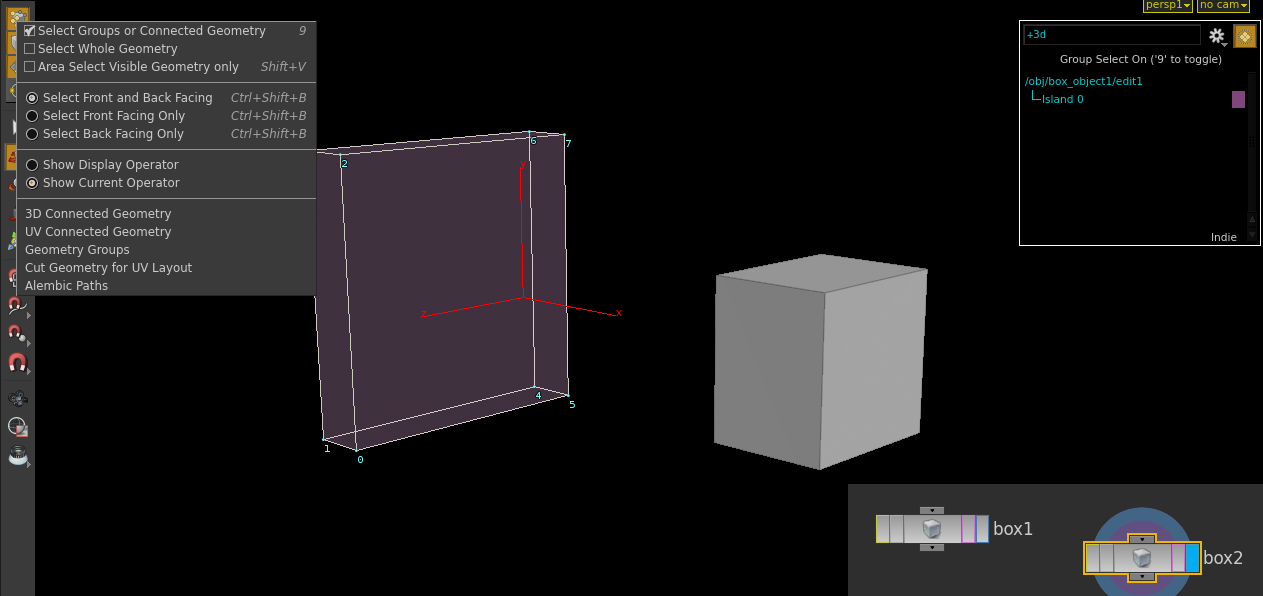
I used to work a lot in Maya with mutiple objects that I aligned to each other. To do that I typically manipulated the pivot of one object and then snapped it to a vertice of another object. I'd like to do this in Houdini as well, but I'm having trouble with it. When I create multiple objects within a container, I am unable to modify their pivot manually. Tpyically I'll want to modify pivot and then snap it to one of the points of the object. However, I seem to be unable to manually manipulate a pivot of an object inside a container when I have selected the object with the 3D Connected Geometry setting.
Am I overseeing something or is this approach just not suited for Houdini?
Edited by JohannesKristmann - Oct. 3, 2016 16:22:45
The boxes corner ( point number 7 ) follows the spheres y pivot. The rest of the box follows too.
Did you also want only the corner point to move/follow while the rest of the box stays the same? I beleive and edit node added could do the trick.
And perhaps a bit of a digression if you want to get a bit more ‘under the hood’ you might want to look a vex - this guy covers an example of doing rotations around a pivot.
Ok…so..I played with it for a bit..no..edit node isn't it…I used a combination of group and transform node.
Mind you I only did the work for the y axis of pivot point.
If either the sphere or box moves in the y direction the corner of the box will follow where the pivot point is ( in this case just the y value of the pivot point).
Also, there are many other ways to do this. Maybe someone can chime in and show a more simpler way?
I also attached a hip file showing some basic pivot editing and translation. The bbox() expression and local variables can be substituted with point() instead.