How can I load all fbx files in a folder, process them through a SOP network and export them into another folder. In other words: I need a way to apply one SOP network to a whole 90 different models and I don't want to have to load each file and save with a fbx rop. I need some automatic way, and there must be one, but all tutorials are about something else.
I am confused please help.
Batch process files with SOP using PDG?
985 1 1

-

- animquer
- Member

- 21 posts
- Joined: 7月 2012
- オフライン
-

- alexmajewski
- Member

- 139 posts
- Joined: 8月 2017
- オフライン
A late response, but just in case somebody looks this up in the future, I'll answer.
You start your TOP network with a File Pattern TOP and use it to scan your folder for FBX files. It will generate a separate work item for every file it finds. It will create TOP attributes containing the directory, filename and extension.
You then create your SOP network and start it with a File SOP (and follow it up with whatever changes you need, polyreduce, etc). In that File SOP you set the input path to:
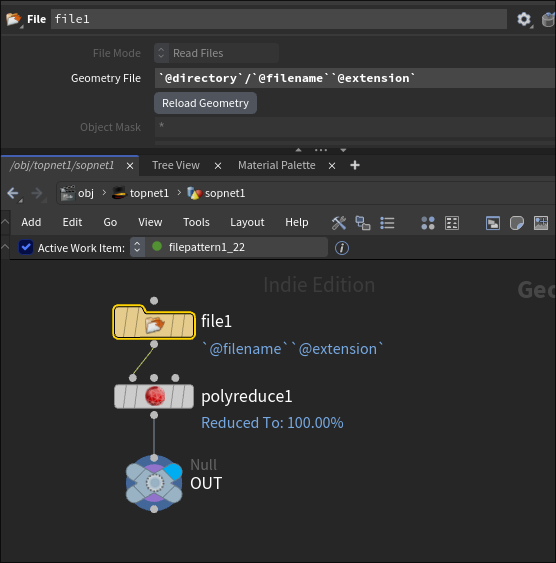
To test it, you can cook your TOP network and left-click one of the dots so it's highlighted. Your SOP network will now display that work item's geometry in the viewport. With a selected dot you can also middle-mouse click path parameters to temporarily expand those @ variables and see where they point to.
Now you can add a ROP FBX Output TOP node and select the final node of your SOP network you want to export, as well as provide the output path. In your case, it could be something like:
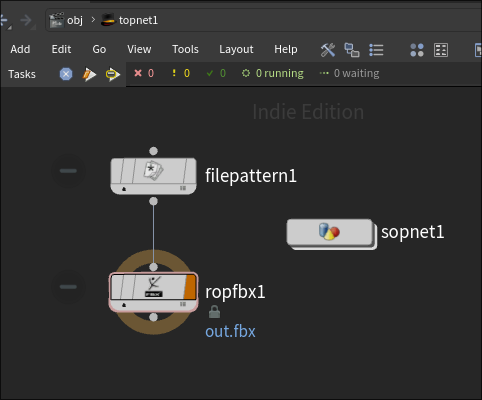
You then cook the ROP FBX Output TOP. And that's all there is to it.
You start your TOP network with a File Pattern TOP and use it to scan your folder for FBX files. It will generate a separate work item for every file it finds. It will create TOP attributes containing the directory, filename and extension.
You then create your SOP network and start it with a File SOP (and follow it up with whatever changes you need, polyreduce, etc). In that File SOP you set the input path to:
`@directory`/`@filename``@extension`To test it, you can cook your TOP network and left-click one of the dots so it's highlighted. Your SOP network will now display that work item's geometry in the viewport. With a selected dot you can also middle-mouse click path parameters to temporarily expand those @ variables and see where they point to.
Now you can add a ROP FBX Output TOP node and select the final node of your SOP network you want to export, as well as provide the output path. In your case, it could be something like:
C:/outputdirectory/`@filename`.fbxYou then cook the ROP FBX Output TOP. And that's all there is to it.
Edited by alexmajewski - 2026年7月16日 07:13:30
-
- Quick Links