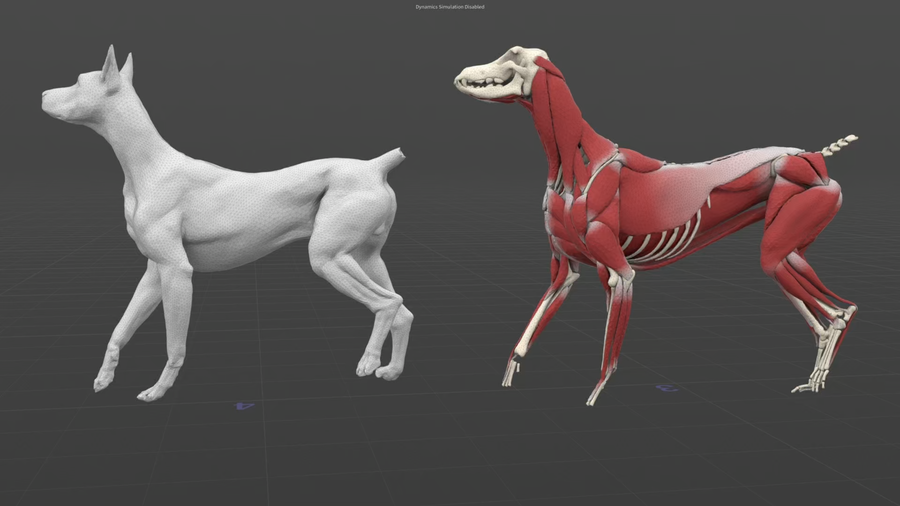
Dobermann Otis
Film/TV
This scene demonstrates a muscle simulation setup on a Dobermann dog using the Otis solver in Houdini 21. It includes a complete muscle workflow, please note that the animation clip is not included in the file. You can also follow along in this Doberman Otis Masterclass, which goes over the scene network: https://vimeo.com/1208505179
CREATED BY

COMMENTS
misha 3 months ago |
the skeleton, skin and muscles are also not included in the file...
Rob_Garcia 2 months, 2 weeks ago |
I found the skin and muscles in the file. The defauly skin is there in one of the caches, I stashed it and brought it back up to the beginning of the flow. The animation seen in the clip is not included. There's a note saying as much. I was able to bypass the get_MOCAP scene and apply a keyframed rig pose to get some simple animation. Everything flows through after that enough for some basic testing.
misha 2 months, 1 week ago |
can you show me the cache...I can't find it....
misha 2 months, 2 weeks ago |
ok, thanks
misha 2 months, 1 week ago |
can you show me the cache...I can't find it....
deeptinm 3 weeks, 6 days ago |
could not see any skeleton, muscles and body in the attached file.
misha 3 weeks, 5 days ago |
ditto
IceBar0n 1 week, 2 days ago |
Simply not working.
Empty scene.
There is node network, but without geometry files learning from this is like reading book when you are blind.
Why even posting broken scene ?
This is unprofessional, because people wasting their time .
IceBar0n 1 week, 2 days ago |
Guys I solved it - simlpy click a button in the bottom right corner of houdini - it is set to Manual Update
Set it to AUTO UPDATE
After this all geometry appears !
I think the author is simply forgot to set this button to auto when saved scene, It would never have occurred to me that the issue was just a button.
I was looking for the problem throughout the entire node network.
It’s absolutely ridiculous that people have been trying to find a solution since July, and nobody has lifted a finger to help them.
Liesbeth_Levick 1 week, 2 days ago |
Yes, sorry, we don't get notified about the comments, so we weren't aware that there was an issue. Indeed, make sure you enable Auto Update as the file is set to Manual. Then the geometry is located in /obj/Dobermann/SOURCE. The file nodes are locked which is equivalent to stashing the geometry in the file.
misha 1 week, 1 day ago |
thanks
Please log in to leave a comment.