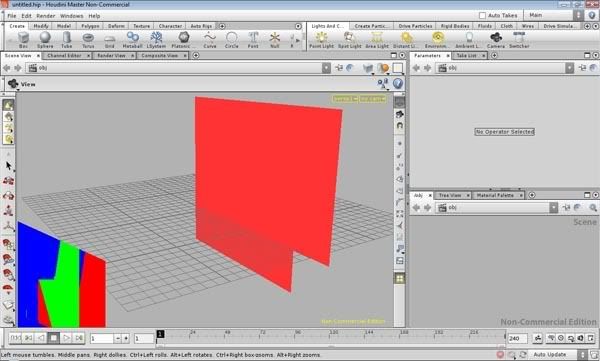
I am new to Houdini, and I must say that its capabilities are simply incredible. However, I seem to be having a really odd problem. I seems that whatever I do in Houdini, there are weird blocks of color in the workspace. I have included a screenshot below. Any help resolving this issue would be greatly appreciated. Thanks a lot!
This is something I've seen when using Intel integrated graphics drivers. You can work around it by setting the environment variable HOUDINI_OGL_SOFTWARE to 1 in your computer properties.
Joe, thank you very much for your prompt answer. I'm sorry to use up even more of your time, Joe, but I'm not sure I understand! I have never had to change environment variables before, and I do not know how. Is the “HOUDINI_OGL_SOFTWARE” a variable that already exists, or it one that I have to create? If so, how do I do that?
Thanks again, Quinn
By the way, you were right: I do have an Intel integrated graphics driver.
Go to XP's Start Menu > Control Panel > System > Advanced tab > Environment Variable button and add a new System (or User) variable of the name described above.
Yikes! I created the new environment variable, and set its value to 1. I wish I could say that it worked, but it didn't. :cry: I was still able to follow your instructions, but does it matter that I have Vista?
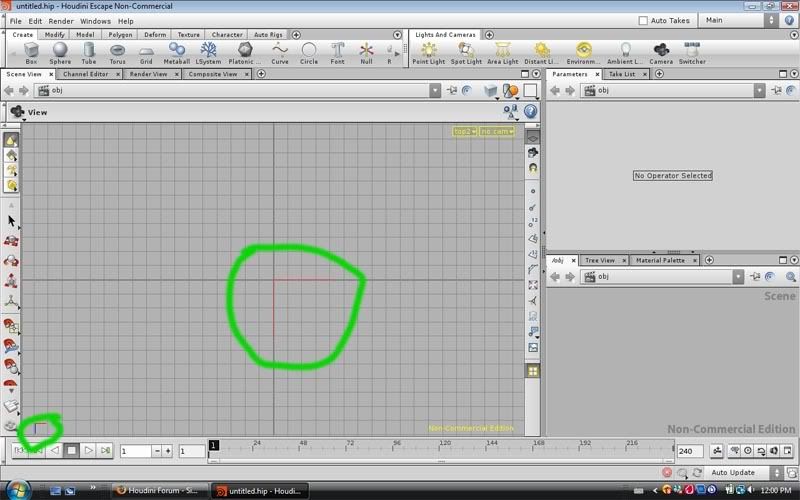
Also, I was thinking. The screenshot below is what Houdini looks like from the top view. So it is pretty clear to me that the two things I circled in green are causing the problems. Is there a way (in preferences or something) to remove them?
Yep, everything looks fine there. You're looking from the top down, and it's showing the “gnomon” or axis display. If you switch to a regular perspective view (click on the word “top1” in your viewport to open the menu that lets you change what type of viewport you're using), then tumble around, you will see it rotate.
You can turn it off by pressing ‘d’ in the viewport - I don't have Houdini in front of me right now so I don't remember the exact wording of the option, but it should be right there in the tab that opens by default.
Oh! I get it! Now I feel like quite a fool! Everything is working fine now. Thanks Joe, Pagefan, and jason_iversen! I will remember your patience and kindness.
It seams that I am now having the same troubles that started this thread. I recently, in the last week, had to rebuild my computer. and when I got everything installed, Houdini is showing this problem. I have tried several different drivers, and installed the latest Directx. I have also tried to set “HOUDINI_OGL_SOFTWARE” to 1 but it does not go away. I have tried both the 32 and 64 bit versions of Houdini, nojoy. My troubles only effect the gnomons in my viewports, just like the one in the first post of this thread.
Additional info when I try to change views IHoudini crashes with this report Fatal error: Segmentation Fault