
In my opinion, one of the biggest problems with COP is its insane memory consumption. If I'm doing anything more complex than 50 nodes and, God forbid, a 4K texture, 16 GB of VRAM fills up pretty quickly. Even though I've reduced the resolution as much as possible and used mono layers. I played around with a few mosaic patterns a bit – and voila, the memory is full, everything slows down, and sometimes even freezes completely. I suspect that under the hood, many nodes are converting everything to RGBA, which is really bad for 4K, and are needlessly eating up all the memory. Manually resetting the cache in the cache manager helps, yes.
This raises two questions/suggestions: 1) I can see the time spent by node in the performance monitor, but how can I see which one is eating up all the memory? It would be nice to somehow monitor memory consumption. After all, video card memory is the most important resource for COP and is completely non-expandable. 2) It would be nice to optimize the code for lower memory consumption. Perhaps we could optimize monolayers separately? For example, some kind of multilayer blend for monolayers, so the user doesn't have to create dozens of blends, which likely create dozens of unnecessary RGBA channels and waste memory.
High memory consumption in COP.
1075 7 0

-
- Gaalvk
- Member

- 96 posts
- Joined: March 2025
- Offline
-

- jlait
- Staff

- 7133 posts
- Joined: July 2005
- Offline
If you want to cap VRAM consumption you can use Edit::Copernicus Settings::Video Ram. By default we will use all of your VRAM before we start evicting stuff to RAM. For compositing you may get away with a low value for this - the high value is to avoid things like Pyro from swapping.
We don't convert to RGBA in memory - it may look like that because the nodes all operate on RGBA, but they are doing just-in-time widening; so the memory use of a Mono channel is just one mono value. However, we DO operate on 32bit float by default, so that is 4x the memory of a 8-bit image.
An important optimization we don't do yet is to throw away the results that are no longer needed. Currently every COP node keeps its output, which adds up quickly at 4k. This means you can walk the network without recooking; but that is cold comfort when you've run out of memory.
We don't convert to RGBA in memory - it may look like that because the nodes all operate on RGBA, but they are doing just-in-time widening; so the memory use of a Mono channel is just one mono value. However, we DO operate on 32bit float by default, so that is 4x the memory of a 8-bit image.
An important optimization we don't do yet is to throw away the results that are no longer needed. Currently every COP node keeps its output, which adds up quickly at 4k. This means you can walk the network without recooking; but that is cold comfort when you've run out of memory.
-

- jsmack
- Member
- 8377 posts
- Joined: Sept. 2011
- Offline
jlait
If you want to cap VRAM consumption you can use Edit::Copernicus Settings::Video Ram. By default we will use all of your VRAM before we start evicting stuff to RAM. For compositing you may get away with a low value for this - the high value is to avoid things like Pyro from swapping.
We don't convert to RGBA in memory - it may look like that because the nodes all operate on RGBA, but they are doing just-in-time widening; so the memory use of a Mono channel is just one mono value. However, we DO operate on 32bit float by default, so that is 4x the memory of a 8-bit image.
An important optimization we don't do yet is to throw away the results that are no longer needed. Currently every COP node keeps its output, which adds up quickly at 4k. This means you can walk the network without recooking; but that is cold comfort when you've run out of memory.
How is memory managed on platforms with unified memory? With no main memory to evict to, is that setting used at all? Is there any unnecessary copying of layer data when moving from cpu to gpu compute? I'm finding even with 128GB of unified memory, it can be pretty constraining, I can't imagine what it's like with only 16GB of VRAM.
-
- elovikov
- Member

- 162 posts
- Joined: June 2019
- Online

I wonder now does it also mean that putting nodes inside compile block helps to save memory?
I actually always do that, but can't support if it helps, it just feels right Especially when I separate some nodes into subnet, I usually create a block inside. Same for hdas.
It does show that thumbnails are not updated, so I see difference in cooking behaviour at least. Just curious now if nodes inside block are not polluting memory
I actually always do that, but can't support if it helps, it just feels right
Especially when I separate some nodes into subnet, I usually create a block inside. Same for hdas.It does show that thumbnails are not updated, so I see difference in cooking behaviour at least. Just curious now if nodes inside block are not polluting memory
-
- Gaalvk
- Member
- 96 posts
- Joined: March 2025
- Offline
This is an interesting idea I'd forgotten about. I'm not sure it makes sense, though. It's probably based on the block itself: if you put nodes in a compile block, they're compiled into a single codebase and don't store intermediate caches. It seems good, but it's extremely inconvenient during development and constant changes. It seems much easier to press a hotkey and reset the cache in the cache manager. Blocks are good as functions, but without the ability to pass a number as a parameter, their usefulness approaches zero, in my opinion.
But HDA is interesting, yes. Perhaps HDA doesn't store intermediate layer caches internally on each node and doesn't need a compile block, or perhaps it does. Both options are logically sound. This is, of course, completely unclear.
But HDA is interesting, yes. Perhaps HDA doesn't store intermediate layer caches internally on each node and doesn't need a compile block, or perhaps it does. Both options are logically sound. This is, of course, completely unclear.
-
- elovikov
- Member
- 162 posts
- Joined: June 2019
- Online
well, it is really unclear
but it's still possible to parametrize block via expressions, it's just really not clear how it works, especially with two cooking engines under the hood
like consider this example, I've created some shape or grunge. I've extracted it to subnet, promote some parameters and put everything in the block with "Compiled" check box. It's like Substance Designer subgraph
and it's working
I think here compilation is baking values, so it recompiles the block after values changed
the interesting part is to look inside subnet:
with block:
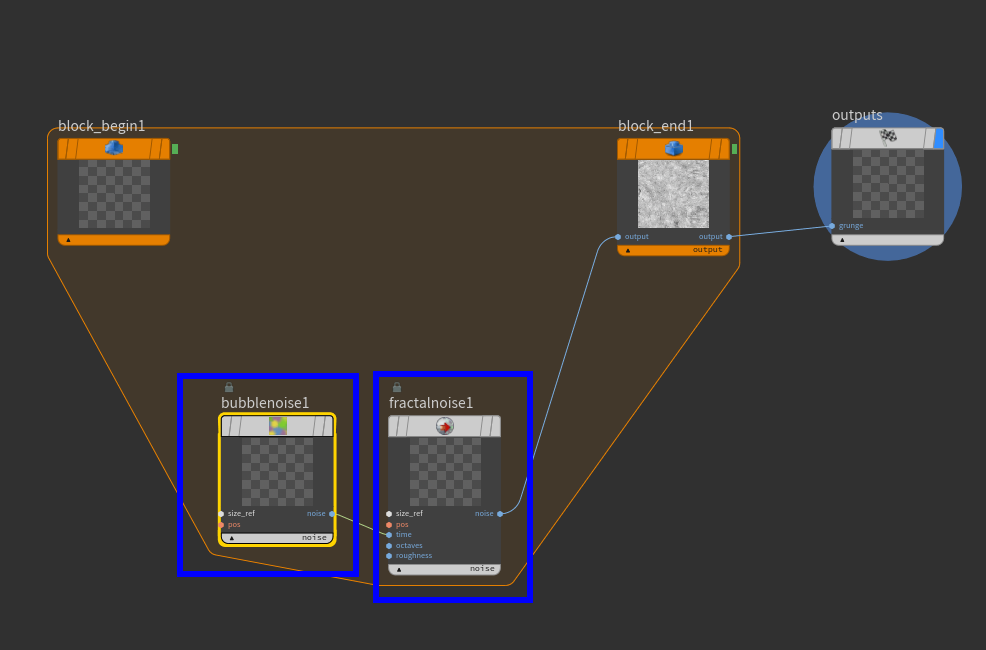
and without:

with block I still have live result depending on promoted parameters, but intermediate results are not there
the question is does it help at all? may be it's just some stupid side effect in UI and non intended workflow
so yeah, I'd love to see modern version of Jeff masterclass about compilation, apex, cooking and opencl place in it
personally both previous masterclasses (OpenCL and Compiled SOPs) were very insightful and helpful to understand how exactly it works and what it tries to solve
but it's still possible to parametrize block via expressions, it's just really not clear how it works, especially with two cooking engines under the hood
like consider this example, I've created some shape or grunge. I've extracted it to subnet, promote some parameters and put everything in the block with "Compiled" check box. It's like Substance Designer subgraph
and it's working
I think here compilation is baking values, so it recompiles the block after values changed
the interesting part is to look inside subnet:
with block:
and without:
with block I still have live result depending on promoted parameters, but intermediate results are not there
the question is does it help at all? may be it's just some stupid side effect in UI and non intended workflow
so yeah, I'd love to see modern version of Jeff masterclass about compilation, apex, cooking and opencl place in it
personally both previous masterclasses (OpenCL and Compiled SOPs) were very insightful and helpful to understand how exactly it works and what it tries to solve
-
- jlait
- Staff
- 7133 posts
- Joined: July 2005
- Offline
elovikov
I wonder now does it also mean that putting nodes inside compile block helps to save memory?
Yes, it does.
When compiled we do a feed-forward cook of the graph so can minimize the use of layers. We also can avoid cooking "dead" outputs on nodes, so you can get a performance boost there too.
It is, however, not very tenable to keep wrapping stuff in compiled blocks when playing around :>
There are some gotcha's, because as you note the parmaeters have to be all cooked while compiling the compiled block; not just in time while executing.
-
- jlait
- Staff
- 7133 posts
- Joined: July 2005
- Offline
jsmack
How is memory managed on platforms with unified memory? With no main memory to evict to, is that setting used at all? Is there any unnecessary copying of layer data when moving from cpu to gpu compute? I'm finding even with 128GB of unified memory, it can be pretty constraining, I can't imagine what it's like with only 16GB of VRAM.
On these platforms you'll want to leave the VRAM percentage to 100 as you don't want to ever "swap" to main memory. As you note, that will just unnecessarily copy it to a new location leaving you no farther ahead. Worse yet, if it is a read-only layer; next time it is needed for the GPU it will be copied to the GPU (and hence to normal RAM) and "helpfully" keep the CPU copy around. The same argument applies if you run in HOUDINI_OCL_DEVICETYPE CPU mode.
With 16gb of VRAM you'd likley have a similar experience, just that you'll be hitting the swapping to main memory - so you'd basically just have an "extra" 16gb of RAM to work with.
-
- Quick Links