| Since | 20.5 |
This component sets up the necessary constraints and blends to do a local blend between an IK and FK chain.
The IK/FK blend control consists of two parts - an abstract control that drives the blend value between IK and FK, and a position control that allows you to move the abstract control around:
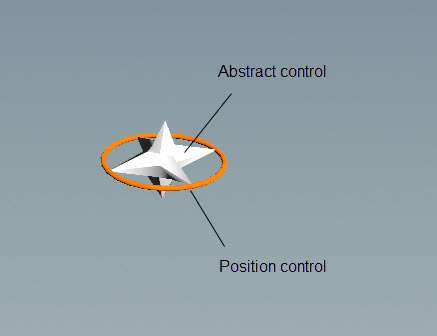
The IK/FK blend component uses an IK chain as a reference, so one must be set up upstream using the multi IK component. However, it is not necessary to have existing FK nodes in the hierarchy. The IK/FK blend finds the relevant skeleton joints used for IK, and automatically creates FK nodes at those joints if they don’t already exist.

See rigging a character for an example use of this component.
Parameters 
Name
The name to add to the IK/FK blend abstract and position controls. When using Segments, the segment name is also added to the controls.
Settings 
Control Position
The position of the abstract control as a relative offset. By default, the abstract control is placed in the middle of the joint chain.
Control Scale
The scale of the abstract control.
Promote T
When turned on, promotes the translate of the FK controls added by this component.
Promote R
When turned on, promotes the rotate of the FK controls added by this component.
Promote S
When turned on, promotes the scale of the FK controls added by this component.
Driven 
Segments
Segments are tags that separate each IK/FK chain. For example, *Leg loops over tags L_Leg and R_Leg. Tags can be set up on skeleton joints using an  Attribute Adjust Array SOP. See preparing skeletons for rigging for more information.
If Segments is empty, the IK/FK blend logic is run once.
Note
The segments parameter does not take APEX path patterns, for example, the #<tag> function. Instead, specify the tag names directly in this field.
IK Nodes
An APEX path pattern that specifies the IK nodes that are included in the IK/FK blend.
FK Prefix
The prefix to add to the FK chain. When setting up the IK/FK blend, you don’t need to have FK nodes in the hierarchy. The IK/FK blend component creates an FK chain if one doesn’t already exist.
FK Suffix
The suffix to add to the FK chain. When setting up the IK/FK blend, you don’t need to have FK nodes in the hierarchy. The IK/FK component creates an FK chain if one doesn’t already exist.
FK Nodes
An APEX path pattern that specifies the FK nodes to include in the IK/FK blend. This can be used if the FK nodes already exist in the rig hierarchy. The IK/FK component loops over the IK nodes, and uses the mapping value to make sure the IK and FK hierarchies match.
Parent 
Parent
The main driver of the abstract control. When empty, the abstract controls are not parented.
Tags 
| See also |
 APEX Autorig Component